

CSS Gradient Generator: Design Gradients Visually, Ship Clean Code Instantly
Published on AlphaSEOTools.com | Author Alpha Team
There’s a version of web design where you open a text editor, type colour hex codes from memory, guess at angle degrees, and refresh the browser fifty times until the gradient looks right. And then there’s the smarter version — where you open a CSS gradient generator, drag a couple of colour stops into place, and copy a line of clean, ready-to-use CSS in thirty seconds. One of these is a workflow. The other is a time sink.
This article is for anyone who wants to understand CSS gradients properly — what the different types do, when to use each one, and how a CSS gradient generator makes the whole process faster and more accurate. Whether you’re a developer, a designer who codes, or someone just trying to make a landing page look better without touching Photoshop — this covers everything that actually matters.
What a CSS Gradient Is — and Why It Beats a Background Image
A CSS gradient is not an image file. It’s a browser-rendered visual effect generated entirely from a mathematical instruction in your stylesheet. According to MDN Web Docs, CSS gradient functions belong to the <image> data type, meaning they can be applied anywhere a background image can — with zero HTTP requests and perfect sharpness at every screen resolution.
That last part matters more than it sounds. A decorative background gradient saved as a PNG can weigh anywhere from 15KB to over 100KB depending on complexity. The equivalent CSS gradient adds roughly 100 to 300 characters to your stylesheet. No extra network request, no file to compress or optimise, and it scales perfectly on every retina or high-DPI display without looking soft or blurry.
A CSS gradient generator makes this the path of least resistance. Instead of guessing at syntax, you design visually and the tool writes the code. That’s the entire value proposition — and it delivers it completely for free.
The Five CSS Gradient Types Explained
CSS gives you five gradient functions. Each one solves a different design problem, and a good CSS gradient generator lets you work with all of them without memorizing a single line of specification.
* linear-gradient()
The most used gradient type on the web. Colour transitions happen along a straight line at any angle you choose — horizontal, vertical, or diagonal. The direction is set with either a keyword like “to right” or a degree value like 45deg. Two colour stops is the minimum; add more stops to build multi-colour transitions, or place two stops at the same position for a sharp-edged stripe with no blur.
* radial-gradient()
Colour radiates outward from a centre point in a circular or elliptical shape. You control the focal point position, the shape, and how far the gradient extends before it hits the edge. This is the right choice for spotlight effects, glowing UI elements, badge backgrounds, and vignette overlays. Move the focal point off-centre to create more dramatic directional lighting.
Looking For The Best Relatable Captions For Instagram: We Have The Best Solution For You; See Prayers Logic.
* conic-gradient()
Colour sweeps around a centre point like a clock hand or pie chart, rather than radiating outward. The transition axis is angle rather than distance. This is the tool for pie charts, progress rings, and colour wheel interfaces. Browser support is solid on Chrome 69+, Firefox 83+, and Safari 12.1+, which per Can I Use covers the overwhelming majority of current users.
* repeating-linear-gradient() and repeating-radial-gradient()
The repeating variants tile their gradient pattern infinitely across the element. The tile size is determined by where the last colour stop falls. These are the functions behind striped backgrounds, diagonal hatching, and concentric ring patterns — effects that used to require image sprites or SVGs but now require nothing more than a few lines of CSS.
CSS Gradient Functions: Quick Reference
| CSS Function | Direction | Browser Support | Best Used For |
| linear-gradient() | Straight line, any angle | Chrome 26+ / FF 16+ / Safari 6.1+ | Hero backgrounds, buttons, dividers |
| radial-gradient() | Circle or ellipse from a point | Chrome 26+ / FF 16+ / Safari 6.1+ | Glow effects, spotlights, avatars |
| conic-gradient() | Sweep around a centre point | Chrome 69+ / FF 83+ / Safari 12.1+ | Pie charts, colour wheels, loaders |
| repeating-linear-gradient() | Tiled linear pattern | Chrome 26+ / FF 16+ / Safari 6.1+ | Stripes, diagonal patterns |
| repeating-radial-gradient() | Tiled concentric rings | Chrome 26+ / FF 16+ / Safari 6.1+ | Target rings, ripple textures |
All browser compatibility data above is sourced directly from MDN’s browser compatibility tables — the most reliably maintained reference in front-end development. A CSS gradient generator handles the syntax for every function in that table, so you can try any of them without needing to consult the spec first.
Inside Alpha SEO Tools’ CSS Gradient Generator
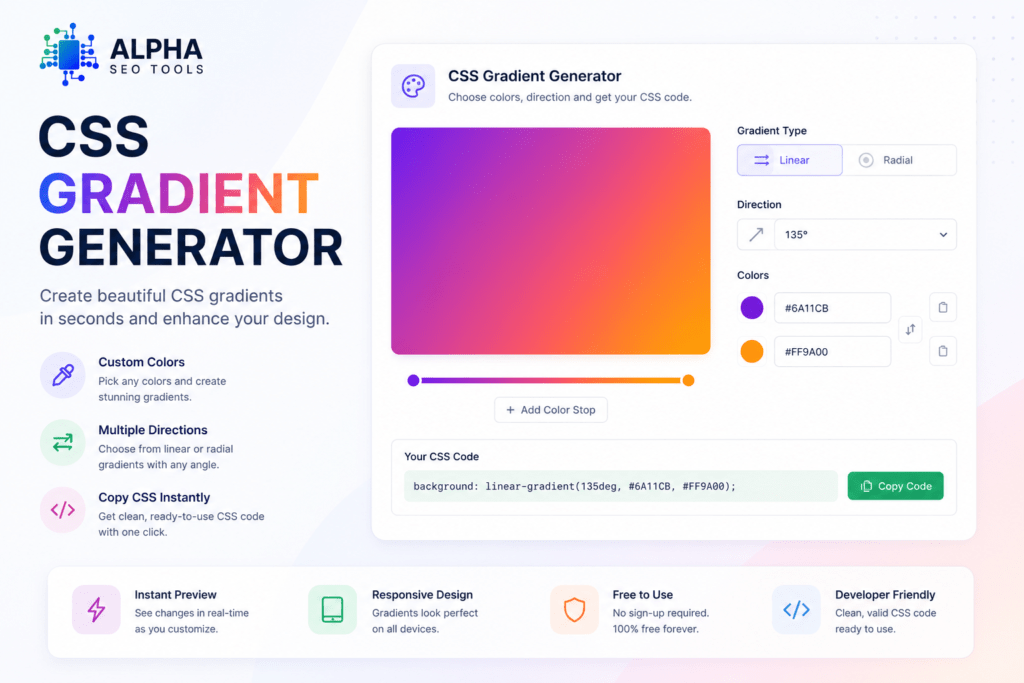
Alpha SEO Tools’ CSS gradient generator runs on a live-preview model — every change you make updates the visual output in real time, which is exactly how a colour-sensitive tool should work. You see what you’re building as you build it, not after you paste code into a browser and reload.
| WHAT THE TOOL GIVES YOU |
| Live gradient preview that updates instantly as you adjust colours, stops, and direction |
| Full control over colour stop positions — drag to place, no percentage calculation needed |
| Clean, production-ready CSS output with no unnecessary vendor prefixes |
| One-click copy to clipboard — paste straight into your stylesheet |
| Free on every use, no account or signup required |
Step 1 — Pick Your Gradient Type and Direction
Open the CSS gradient generator and choose between linear and radial. Set your angle or direction — the preview responds immediately. For most background fills and button styles, start with linear. Switch to radial when you want a glow, a spotlight, or an effect that emanates from a specific point.
Step 2 — Add Your Colours and Stop Positions
Select your colours using hex, RGB, or the built-in colour picker. Drag the stop markers to control where each transition begins. The CSS gradient generator shows you the visual result as you move each stop — no guesswork, no refresh cycle.
Step 3 — Copy and Use the Code
When the gradient looks right, copy the generated CSS. The output is clean and immediately usable — drop it directly into a background or background-image property and you’re done. No editing, no reformatting.
Why CSS Gradients Are an Underrated Performance Win
Most people use a CSS gradient generator purely for design reasons — and that’s completely valid. But there’s a performance argument for CSS gradients that doesn’t get talked about nearly enough, especially given how directly page speed connects to SEO.
Google’s Core Web Vitals framework, specifically Largest Contentful Paint (LCP), is sensitive to how many resources a page loads and how heavy they are. Background images are some of the most common culprits behind slow LCP scores. Per Google’s web.dev documentation, LCP is calculated from the moment the page starts loading to when the largest visible element finishes rendering — and a heavy background image on a hero section is often that element.
Replacing decorative background images with CSS gradients removes those image requests entirely. The gradient renders from your existing stylesheet — which is already being loaded — with no additional network round-trip. That’s a direct improvement to page load time, LCP, and by extension, your site’s overall page experience signals. Using a CSS gradient generator to design those gradients isn’t just a workflow shortcut — it’s quietly doing SEO work at the same time.
Frequently Asked Questions (FAQ’s)
Do I need to know CSS to use a gradient generator?
Not at all. A CSS gradient generator is built specifically for visual design — you choose colours, drag stops, and set a direction, and the tool writes the CSS for you. You only need to know where to paste the output in your project, which is almost always a background or background-image property.
Can I use more than two colours in a gradient?
Yes — CSS gradients support any number of colour stops. A CSS gradient generator with a visual stop editor lets you add, position, and remove stops without calculating percentages manually. Multi-stop gradients are where the visual editor pays off most — trying to tune three or four stops in raw code is genuinely tedious.
Will CSS gradients work on all browsers?
Linear and radial gradients have had full cross-browser support since 2013. Conic gradients are slightly newer but are well-supported on all modern browsers. For edge-case support on very old browsers, declaring a solid background-color before the gradient line in your CSS ensures those users still see a reasonable fallback. Per Can I Use, global support for core CSS gradient functions sits above 97%.
Can I apply a gradient to text instead of a background?
Yes. The standard technique is to set the gradient as a background on the text element, then apply -webkit-background-clip: text and -webkit-text-fill-color: transparent to clip the gradient fill to the shape of the characters. Generate your gradient with the CSS gradient generator first, then wrap the output in those two additional properties — the result is scalable, fully selectable gradient text with no image export needed.
The Bottom Line
CSS gradients are one of those features that looks like a design decision but quietly touches performance, scalability, and maintainability all at once. Getting them right used to mean memorising syntax and refreshing the browser after every small change. A CSS gradient generator removes that entire friction layer — you design visually, copy the output, and ship it.
Alpha SEO Tools’ CSS gradient generator is free every time you use it, requires no account, and gives you production-ready code the moment your design looks right. Whether you need a two-colour hero section background or a complex multi-stop radial effect — build it visually, copy the code, and move on.
Better design doesn’t always need more time. Sometimes it just needs the right tool.
alphaseotools.com | CSS Gradient Generator | Sources: MDN Web Docs, Can I Use, Google web.dev


