
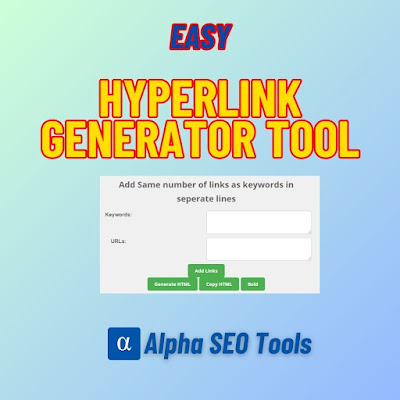
Add Same number of links as keywords in seperate lines
First keyword will be linked to first link & 2nd with second link and so on
HTML Code:
Try other free SEO tools also:
- Keyword Density Checker
- Text Transformation Tools – 40 tools in one
- Live HTML Viewer
Free Hyperlink Generator Tool – Build HTML Hyperlinks in Seconds
Table of Contents
Guest posting is one of the most effective link-building strategies in SEO — but anyone who has manually written HTML anchor tags for a list of backlinks knows how tedious it gets. For every link you want to place, you have to write the full HTML, match the right keyword to the right URL, wrap it in the correct tags, optionally bold it, then copy it into your article. Multiply that by ten or twenty links per post and it becomes a serious time sink.
The Free Hyperlink Generator Tool at AlphaSEOTools eliminates this entirely. Enter your keywords in one box and your URLs in another, click two buttons, and every hyperlink is generated as clean, ready-to-paste HTML in seconds. No manual coding, no mismatched pairs, no formatting errors.
Use it free here: Free Hyperlink Generator Tool – AlphaSEOTools
What Is the Hyperlink Generator Tool?
The Hyperlink Generator Tool is a free online utility that takes a list of anchor text keywords and a matching list of URLs and automatically generates the corresponding HTML hyperlinks — one keyword paired with one URL in the correct order.
It is specifically designed for guest posting, SEO link building, content editors, and anyone who regularly needs to produce multiple HTML links at once without writing the code by hand. The output is clean, copyable HTML that can be pasted directly into a WordPress post, an HTML editor, or any CMS that accepts HTML input.
How the Hyperlink Generator Tool Works – Complete Step-by-Step Guide
The workflow has four steps and takes under a minute once you have your keywords and URLs ready.
Step 1: Enter Your Keywords
In the Keywords box, type or paste your anchor text keywords — one keyword per line. These are the words or phrases that will become the clickable text in your hyperlinks.
| Example keywords (one per line): SEO tools keyword density analyzer free hyperlink generator guest posting services |
The number of keywords you enter determines how many hyperlinks will be generated. If you enter five keywords, you need exactly five URLs — one for each.
Step 2: Enter Your URLs
In the URLs box directly below, enter your destination URLs — one URL per line, in the same order as your keywords. The first keyword will be linked to the first URL, the second keyword to the second URL, and so on.
| Example URLs (matching the keywords above, one per line): https://alphaseotools.com/all-tools-at-alpha-seo-tools-free-fast/ https://alphaseotools.com/keyword-density-analyzer-free-and-fast/ https://alphaseotools.com/free-hyperlink-generator-tool-for-guest-posts/ https://alphaseotools.com/premium-guest-posting-services-by-aamir-for-powerful-seo/ Important: Every URL must begin with https:// for the links to work correctly. |
Step 3: Click Add Links
Once both boxes are filled with matching numbers of keywords and URLs, click the Add Links button. This connects each keyword to its corresponding URL internally, preparing the pairs for HTML generation. Think of this as the matching step — it confirms the keyword-to-URL relationships before any output is produced.
Step 4: Click Generate HTML
After clicking Add Links, click Generate HTML. The tool instantly produces the complete HTML anchor tags for every keyword-URL pair and displays them in the HTML Code section below the buttons. The output is clean, valid HTML ready to be copied and used anywhere.
| Example output for the keywords and URLs above: <a href=”https://alphaseotools.com/all-tools-at-alpha-seo-tools-free-fast/”>SEO tools</a> <a href=”https://alphaseotools.com/keyword-density-analyzer-free-and-fast/”>keyword density analyzer</a> <a href=”https://alphaseotools.com/free-hyperlink-generator-tool-for-guest-posts/”>free hyperlink generator</a> <a href=”https://alphaseotools.com/premium-guest-posting-services-by-aamir-for-powerful-seo/”>guest posting services</a> |
Optional: Make Links Bold
Before or after generating HTML, you can click the Bold button to wrap every hyperlink in bold HTML tags. This is particularly useful for guest posts where the editor of the receiving site prefers links to stand out visually, or where your style guide calls for bold anchor text.
| Bold output example: <b><a href=”https://alphaseotools.com/keyword-density-analyzer-free-and-fast/”>keyword density analyzer</a></b> This makes the anchor text appear bold and clickable when rendered in a browser. |
Copy HTML – One Click to Clipboard
Once the HTML is generated, the Copy HTML button copies the entire output to your clipboard in a single click. You can then paste it directly into your WordPress Custom HTML block, your guest post draft, your email to an editor, or any HTML-enabled text field.
No selecting, no dragging, no risk of accidentally missing a character. The complete generated HTML is on your clipboard and ready to paste.
Video Guide
Complete Workflow at a Glance
| Step | Action | Result |
| 1 | Enter keywords — one per line in the Keywords box | Anchor text list prepared |
| 2 | Enter matching URLs — one per line in the URLs box | Destination URLs aligned to keywords |
| 3 | Click Add Links | Keywords and URLs paired internally |
| 4 | Click Generate HTML | Full HTML anchor tags generated and displayed |
| 5 (optional) | Click Bold | All links wrapped in bold tags |
| 6 | Click Copy HTML | Complete HTML copied to clipboard — ready to paste |
Why Anchor Text Matters for SEO
The hyperlink generator does more than save time — it helps you build links with intentional, keyword-rich anchor text, which has a direct bearing on SEO. Understanding why anchor text matters helps you use this tool more strategically.
| Anchor Text Type | Example | SEO Effect |
| Exact match | keyword density analyzer | Strong relevance signal; use sparingly to avoid over-optimisation |
| Partial match | free keyword analysis tool | Natural and effective; good balance of relevance and readability |
| Branded | AlphaSEOTools | Builds brand authority; safe and natural-looking link profile |
| Generic | click here / read more | Very weak SEO signal; avoid where possible |
| Naked URL | https://alphaseotools.com | Safe and natural; no keyword signal but adds diversity |
A healthy backlink profile uses a mix of these anchor text types. The Hyperlink Generator Tool makes it easy to produce any of them quickly — simply type the anchor text you want in the keywords box and it becomes the clickable text in the generated link.
For Google’s own guidance on how links affect search rankings, the Google Search Central documentation on links explains how Googlebot follows and evaluates hyperlinks across the web.
The Guest Posting Use Case: Why This Tool Was Built
Guest posting is the primary use case this tool was designed for. When you submit a guest article to another website, the hosting site typically allows you to include a small number of backlinks to your own site or to relevant resources. These links need to be formatted as proper HTML anchor tags before they can be inserted into the article.
Without this tool, the process looks like this for every single link: write the opening anchor tag, paste the URL, close the href attribute, type the anchor text, close the tag. Repeat for every link. Check each one manually to make sure the keyword and URL are correctly matched.
With this tool, you paste all your keywords at once, paste all your URLs at once, click twice, and every link is done. For someone who produces guest posts regularly, the time saving adds up to hours per month.
| Tip for guest post link building: Keep your keyword list and URL list in a simple spreadsheet or notes file. When you are ready to generate links for a new article, paste both columns into the tool and generate in under 30 seconds — no matter how many links. |
Who Benefits Most from This Tool?
| User | How They Use It | Time Saved |
| Guest post writers | Generate all backlinks for an article in one batch before submission | 5–15 min per article |
| SEO agencies | Produce client link reports and HTML link lists quickly | Significant per campaign |
| Content editors | Format links for multiple contributors without manual HTML | Per editing session |
| Link builders | Batch-generate outreach links for multiple target pages | Per outreach round |
| Bloggers | Add internal links to posts without typing HTML manually | Per post |
| Web developers | Generate navigation or reference link lists in HTML | Per project |
Tips for Getting the Best Results
- Always match keyword and URL counts exactly — The tool pairs them by position. If you have 5 keywords and 4 URLs, the last keyword will have no URL to pair with and the output may be incomplete.
- Use descriptive anchor text — Avoid generic phrases like ‘click here’ or ‘read more’. Descriptive anchor text like ‘free keyword density analyzer’ tells both Google and the reader exactly what the linked page is about.
- Vary your anchor text across different guest posts — Using the same exact-match keyword as anchor text across many links can look unnatural to Google. Mix exact match, partial match, and branded anchors across your link-building campaigns.
- Always use https:// in your URLs — URLs without the protocol prefix may not generate correctly. Double-check every URL begins with https:// before clicking Add Links.
- Use the Bold option selectively — Bold links draw attention and are useful in some publishing contexts, but some guest post editors prefer plain anchor text. Check the guidelines of the receiving site before applying bold.
- Preview in a Live HTML Viewer before submitting — After generating and copying your HTML, paste it into the Live HTML Viewer on AlphaSEOTools to confirm every link renders and points to the correct destination before you submit the article.
Related SEO Tools on Alpha SEO Tools
These tools work naturally alongside the Hyperlink Generator for a complete guest posting and SEO workflow:
- Guest Post Maker — Add dofollow backlinks directly into an article with this dedicated guest posting tool.
- Live HTML Viewer — Preview your generated HTML links to confirm they render correctly before using them.
- Keyword Density Analyzer — Check that your anchor text keywords appear at the right density in your article before submitting.
- Bulk URL Opener — Open all your target URLs at once to verify each destination page before generating links.
- Premium Guest Posting Services — Let the Alpha SEO Tools team handle your guest posts end to end for powerful, high-authority backlinks.
Frequently Asked Questions
Why do I need to click Add Links before Generate HTML?
Add Links is the pairing step — it connects each keyword to its corresponding URL based on their matching line positions. Generate HTML then converts those confirmed pairs into properly formatted anchor tags. Clicking Add Links first ensures the tool has correctly matched your inputs before producing any output.
What happens if I have more keywords than URLs?
The tool pairs them sequentially by position — first keyword with first URL, second with second, and so on. If you have more keywords than URLs, the extra keywords at the bottom will not have a URL to pair with and will either be skipped or produce incomplete output. Always ensure both lists have exactly the same number of entries.
Can I generate dofollow and nofollow links with this tool?
The tool generates standard dofollow anchor tags by default, which is appropriate for most guest posting and internal linking use cases. If you need nofollow links, you can add rel=”nofollow” to the generated HTML manually after copying — it takes only a few seconds to add to each tag.
Is the generated HTML compatible with WordPress?
Yes. The generated HTML is standard, valid anchor tag code that works in any HTML-enabled environment, including the WordPress Classic editor, the WordPress Gutenberg Custom HTML block, and any other CMS or email builder that accepts raw HTML input.
Can I use this tool to generate internal links for my own articles?
Absolutely. While the tool was designed with guest posting in mind, it works equally well for generating internal links within your own blog or website. Simply enter your keyword anchor texts and your own internal page URLs, generate the HTML, and paste the links wherever they are needed in your content.
Conclusion: Stop Writing HTML Links by Hand
Every minute spent manually writing HTML anchor tags is a minute that could be spent on strategy, content, or outreach. The Hyperlink Generator Tool removes this low-value task from your workflow completely — turning a multi-minute process of writing, checking, and formatting individual links into a ten-second batch operation.
For guest posters, SEO professionals, content editors, and bloggers who deal with links regularly, it is one of the most immediately practical free tools available.
Generate your hyperlinks now: Free Hyperlink Generator Tool