Grammar Checker Tool | Alpha SEO Tools
Grammar Checker
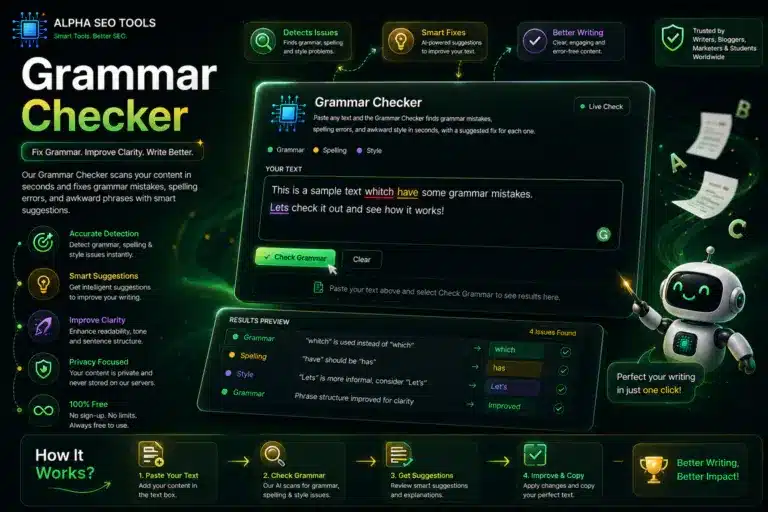
Paste any text and the Grammar Checker finds grammar mistakes, spelling errors, and awkward style in seconds, with a suggested fix for each one.
Grammar Checker: Catch Every Grammar, Spelling, and Punctuation Mistake Before You Publish
Published on AlphaSEOTools.com | Admin Alpha SEO Tools |
A single misplaced comma rarely ruins a piece of writing. However, a pattern of small grammar slips does. Readers notice sloppy sentences even when they cannot name the exact rule you broke, and that quiet loss of trust is exactly what a Grammar Checker is built to prevent. Whether you are a student finishing an essay at midnight, a content writer publishing five articles a week, or someone writing in English as a second language, a reliable tool like this one turns a stressful final read into a fast, confident step you actually look forward to.
This guide walks through what the Grammar Checker on Alpha SEO Tools actually does, why grammar accuracy matters far beyond simple correctness, and how to use the tool so it fits naturally into your writing process instead of feeling like an extra chore.
Why a Grammar Checker Matters More Than Most Writers Realize
Search demand for grammar help has stayed enormous for a straightforward reason: nearly everyone who writes in English needs a second pair of eyes at some point. Students submit essays under deadline pressure and cannot always catch their own errors. Content writers produce large volumes of text on tight schedules, and fatigue makes small mistakes easy to miss. Non native English speakers often understand grammar rules intellectually yet still slip on articles, verb tense, or word order because those patterns feel unnatural in a second language. A Grammar Checker closes that gap for all three groups at once, and it does so instantly rather than making anyone wait for a teacher, an editor, or a colleague to reply.
Beyond the individual writer, clean grammar carries weight with readers and with search engines alike. Visitors judge credibility quickly, and a page full of grammar mistakes reads as rushed or careless no matter how good the underlying idea is. Consequently, writers who run their drafts through a Grammar Checker before publishing tend to see fewer bounce backs from readers and stronger engagement with the content itself.
What the Grammar Checker Actually Looks For
The Grammar Checker on AlphaSEOTools reviews your text across three connected categories, and understanding the difference between them helps you interpret the results correctly.
Grammar issues cover the structural rules of English: subject verb agreement, incorrect tense, missing articles, and sentence fragments. These are the errors most likely to confuse a reader or make a sentence technically incorrect.
Spelling issues flag misspelled words and simple typos. Even strong writers produce these under time pressure, since fast typing naturally introduces slips that a careful second look still misses.
Style issues point out awkward phrasing, unnecessary repetition, or wording that is technically correct but reads clumsily. These matches are softer suggestions rather than hard rules, so you can accept or ignore each one based on your own voice.
The Grammar Checker highlights every match directly inside your text using three colours: blue for grammar, amber for spelling, and violet for style, so you can scan your entire draft visually before reading a single suggestion in detail.
How the Grammar Checker Works
Real grammar checking requires an actual language engine rather than a simple list of banned words, and that is exactly what powers this tool. The Grammar Checker sends your text to a dedicated proofreading service the moment you click Check Grammar, and the results return within a couple of seconds, already sorted and colour coded by category. Nothing about the process requires an account, a download, or a subscription of any kind.
Once the results load, every flagged word or phrase appears underlined directly in your original text, and a suggestion panel underneath lists the exact issue along with one or more replacement options you can copy straight into your document. This side by side view means you never lose the context of a flagged phrase, which is a common frustration with grammar tools that separate the error list from the sentence it came from.
How to Use the Grammar Checker
Getting a result takes three simple steps.
- Paste your text into the input box exactly as it currently reads, including any drafts in progress.
- Select Check Grammar and wait a few seconds while the tool reviews your text.
- Review each highlighted issue in the marked up view, then apply whichever suggestions match what you actually meant to say.
Because the tool works on plain text, it fits naturally into almost any writing process. Draft in your usual editor, paste a paragraph or a full page into it, apply the fixes that make sense, then paste the corrected version back into your document.
Where the Grammar Checker Fits Into Real Writing Work
Academic writing. Students working against a submission deadline benefit enormously from a fast final pass. Running an essay through the tool before submission catches the kind of small errors that quietly cost marks even when the argument itself is strong.
Content publishing. Writers producing multiple articles per week rarely have time for a slow, line by line proofread on every piece. A quick pass through it before hitting publish catches the errors that fatigue lets slip through, and it takes far less time than a full manual review.
Non native English writing. Grammar patterns that feel automatic to a native speaker, like article usage or preposition choice, are exactly where second language writers most often stumble. The Grammar Checker flags these politely and explains the fix, which makes it a genuinely useful learning tool over time rather than a one time correction.
Professional emails and documents. A grammar mistake in a client facing email or a business proposal reads as carelessness regardless of how strong the actual message is. A thirty second check before sending removes that risk entirely.
Getting the Most Out of Every Result
A few habits make the Grammar Checker noticeably more useful once you start relying on it regularly.
Read the suggestion, not just the highlight. A colour coded mark tells you where the issue is, but the message underneath explains why the Grammar Checker flagged it, and that explanation is often more valuable than the fix itself because it teaches you to avoid the same mistake next time.
Treat style suggestions differently from grammar and spelling ones. Grammar and spelling issues are almost always worth fixing outright, since they represent actual errors. Style suggestions are softer, so weigh them against your own voice before accepting a change automatically.
Check smaller sections for long documents. Pasting an entire report at once still works, but reviewing it in sections makes the highlighted results easier to scan and reduces the chance that you skim past something important.
Frequently Asked Questions (FAQ’)
Does the Grammar Checker work for languages other than English?
This version of the Grammar Checker is configured for English, since that covers the vast majority of AlphaSEOTools visitors. The underlying proofreading engine does support other languages, so broader language support may become available as a future update.
Is the Grammar Checker free to use?
Yes. There is no signup, no account, and no payment required. Paste your text, run the check, and copy your corrected version.
How is this different from a basic spell checker?
A basic spell checker only compares individual words against a dictionary, which means it misses grammar problems entirely, such as using the wrong verb tense or leaving out a required article. The Grammar Checker reviews full sentences for structural correctness in addition to spelling, so it catches a much wider range of mistakes.
Will it rewrite my entire text for me?
No. The tool flags specific issues and suggests targeted fixes rather than rewriting your writing wholesale. You stay in full control of every change, and your voice and phrasing remain your own throughout the process.
Is there a text length limit?
The tool handles anything from a single sentence up to a full article comfortably. For very long documents, checking in sections tends to produce results that are easier to review at a glance.
Other AlphaSEOTools Utilities Worth Pairing With This One
A clean, error free draft is only one part of a solid publishing workflow, and a few other AlphaSEOTools utilities handle the steps that come right before and after a grammar pass. First, the Free Word Counter Online and Character Counter Tool confirms your draft hits the length you are targeting before you even open this tool. From there, the Keyword Density Analyzer checks that your target keyword appears at a natural frequency once your grammar pass is complete. Finally, the Google SERP Preview Tool shows exactly how your polished title and description will look in search results. Together, these tools cover language quality, keyword balance, and search presentation in one consistent workflow.
Clean Writing Is Not a Luxury Anymore
Readers, students, editors, and search engines all respond to the same underlying signal: writing that reads as careful earns more trust than writing that reads as rushed, regardless of how strong the ideas underneath actually are. A Grammar Checker exists precisely to close that gap in the minutes before you publish, submit, or send, rather than leaving you to discover a mistake after it is already too late to fix.
Paste your draft, run the check, and apply the fixes that genuinely improve your sentence. That is the entire job this tool was built to do, and it takes less time than reading this paragraph twice.
Write with confidence. The Grammar Checker makes sure your grammar backs it up.
alphaseotools.com | Article: Grammar Checker | Powered by LanguageTool