

Published on AlphaSEOTools.com | Admin Alpha SEO Tools Team
Choosing colors for a design project sounds like the creative part of the job. In reality, it is often the part that takes the longest, produces the most second-guessing, and ends with you staring at a screen trying to decide between two shades of blue that look identical after twenty minutes. A random color palette generator cuts straight through that paralysis by giving you a starting point that is visually coherent, instantly generated, and completely free to use.
This article covers how a random color palette generator actually works under the hood, what colour theory principles sit behind good palette generation, how the lock feature changes the way you use these tools, and why Alpha SEO Tools built one worth bookmarking.
What a Random Color Palette Generator Actually Does
A random color palette generator is a tool that produces a set of colors grouped together into a usable palette, either through pure mathematical randomness or through algorithmic rules based on colour theory. The output is displayed visually as a set of color blocks alongside their hex codes, giving you immediately usable values you can drop into any design tool, CSS stylesheet, or brand document.
The core of how this works is the hexadecimal color system. Every color a digital screen can display is described by a six-character code made up of the numbers 0 to 9 and the letters A to F. The first two characters define how much red is in the color, the middle two define the green component, and the last two define the blue. Because each pair has 256 possible values, the full hexadecimal system can represent exactly 16,777,216 distinct colors. A pure random generator selects six characters from this range and combines them to produce a valid, unique color.
Pure randomness produces interesting results but not always harmonious ones. The more sophisticated approach, which a good random color palette generator uses, applies colour theory rules to ensure the colors in a palette actually work together rather than simply coexisting on the same screen.
The Colour Theory Behind a Good Palette
Colour theory is the formal study of how colors interact, what emotional responses they produce, and which combinations feel visually balanced. The foundational principles were documented by Johannes Itten in his 1961 work The Art of Color, and the core rules remain the basis for how digital tools approach palette generation today. A random color palette generator that applies these rules produces palettes that feel intentional rather than accidental.
The color wheel is the reference system all harmony types are built on. Colors positioned at specific geometric relationships to each other on the wheel produce predictable visual effects when used together. Here is how the main harmony types work:
| Harmony Type | How It Works | Visual Feeling | Best Used For |
| Analogous | Colors sitting adjacent on the colour wheel | Calm, serene, unified | Nature scenes, wellness brands |
| Complementary | Colors directly opposite each other on the wheel | High contrast, vibrant energy | Call-to-action buttons, sports brands |
| Triadic | Three colors equally spaced around the wheel | Balanced, playful, dynamic | Children’s media, creative agencies |
| Monochromatic | One base hue in varied brightness and saturation | Clean, minimal, professional | Corporate design, SaaS dashboards |
| Split-Complement | Base color plus two colors adjacent to its opposite | Softer contrast than complement | Editorial design, lifestyle brands |
Understanding which harmony type you are working with helps you use a random color palette generator more intentionally. Rather than generating palettes until one looks right by chance, you can select the harmony type that fits the emotional tone of your project and narrow your search significantly.
How to Actually Apply a Generated Palette: The 60-30-10 Rule
Generating a palette is only the first step. Knowing how to distribute those colors across a design is what determines whether the end result looks polished or chaotic. The 60-30-10 rule is the most widely used guideline for this and applies equally whether you are designing a website, a social media graphic, or a printed document.
The principle divides your color usage into three proportions. Sixty percent of your design space uses the dominant background color, which is typically the most neutral or subdued shade in the palette. Thirty percent goes to a secondary structural color that supports the layout without competing with the background. The final ten percent is reserved for your accent color, which is the brightest or most vivid shade and is applied only to the elements you most want the eye to land on, such as call-to-action buttons, links, or key data points.
When you generate a palette using a random color palette generator, mentally assigning your five colors to these three roles before you start designing prevents the common mistake of using all five colors at equal weight, which tends to make a layout feel busy and unfocused.
The Lock Feature: The Most Useful Thing in Any Palette Tool
Most people discover a random color palette generator and use it the same way every time: generate, look, regenerate if they do not like it, repeat. That works but it misses the most efficient workflow these tools support, which is made possible by the lock feature.
The lock feature lets you freeze individual colors in your palette while regenerating the rest. The workflow it enables is genuinely useful. You generate a palette, find one color that is exactly right for your project, and lock that specific shade in place. Every time you generate again, that color stays fixed while the remaining slots produce new combinations around it. This way you are not starting from zero with each attempt. You are progressively narrowing down a palette that fits your project by locking in each color you like one at a time.
Check Our Guide For The Live HTML Viewer Tool Given By Alpha SEO Tools
From a technical standpoint, this works through a dataset attribute in the HTML. Each color block in the generator carries a data-locked flag that is either set to true or left unset. When the randomisation function runs, it checks each card for this flag. If it finds data-locked=”true” on a card, it skips that card entirely and leaves the color unchanged. If the flag is absent, it generates a new color for that slot. This is a clean, minimal implementation that adds significant usability without requiring any complex logic.
The user experience of locking colors also changes how designers interact with a random color palette generator. Instead of passively browsing generated palettes, you become an active participant in building one, locking in each element you like until the full set clicks together. Most designers who use this method report finding a workable palette significantly faster than regenerating without locks.
How Many Colors Does a Palette Actually Need?
The default output of most random color palette generator tools is five colors, which works well as a general-purpose starting point. But the right number depends on what you are building and who you are building it for.
Brand designers working on a logo, business card, or brand identity package typically need three colors at most. A primary color that carries the brand’s main identity, a secondary color for supporting elements, and a neutral for text and backgrounds. More than three colors in a brand identity system tends to create inconsistency rather than richness.
UI and product designers working on a full web application or mobile interface have more complex requirements. A complete design system might need eight to ten distinct colors to cover primary actions, secondary actions, background layers, surface colors, error states, success states, warning indicators, and disabled elements. In this context, a random color palette generator generates the seed colors, and the designer then extends each one into a tonal scale with lighter and darker variations to build the full system.
From a technical implementation standpoint, the number of color slots in a palette generator is not hardcoded in well-built tools. Instead, the generator dynamically creates color blocks based on a variable, which means the number of visible colors can be adjusted through a slider or input field without rewriting the underlying generation logic. This approach is more flexible for both the tool developer and the end user.
Get Easy On Page SEO Solutions With The Alpha SEO Tools Extension
What Alpha SEO Tools’ Random Color Palette Generator Offers
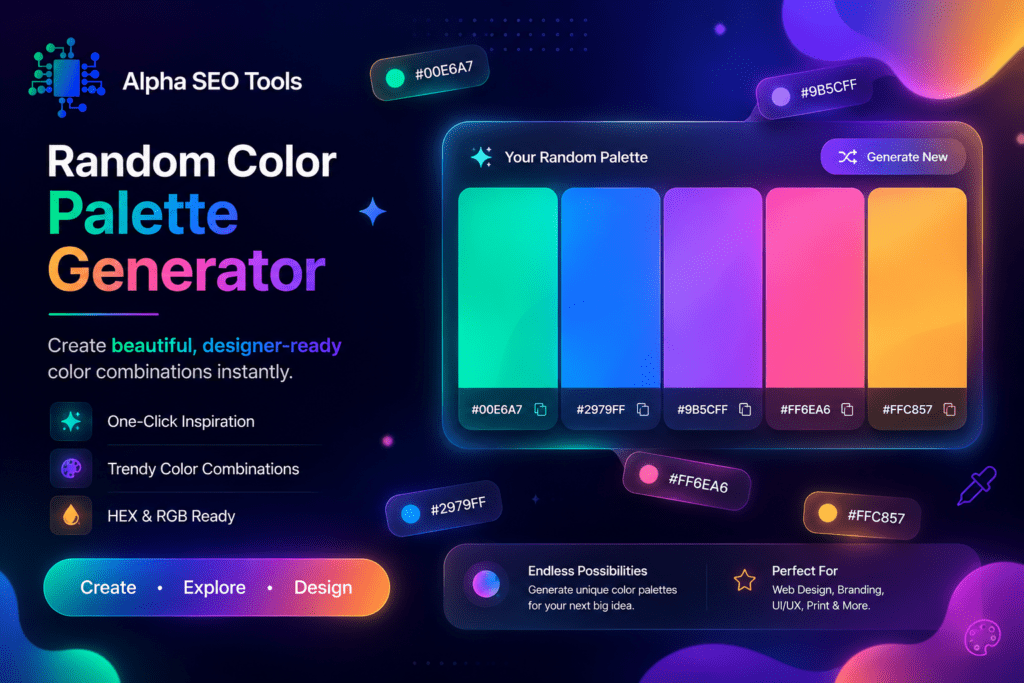
Alpha SEO Tools’ random color palette generator is built for immediate use. Open the page and a palette is already waiting for you. Generate a new one with a single click, copy any hex code directly, and carry those values into whatever design environment you are working in.
| WHAT THE TOOL GIVES YOU |
| Instant palette generation with a single click or keypress |
| Clean hex code display for every color in the palette |
| One-click copy for each hex value so you can paste directly into your project |
| Fresh, visually considered color combinations on every generation |
| Completely free with no account and no usage limits |
The tool sits within the broader Alpha SEO Tools platform, which means you can move between it and related utilities without switching tabs or services. If you are working on a front-end project and need gradient CSS code for your palette colors, the CSS gradient generator handles that in the same session. If the page you are designing needs its images optimised before launch, the bulk image to WebP converter is right there. And if you want to check how the page renders once it is live, the live HTML viewer gives you an instant render without a separate deploy cycle.
Two Things Worth Knowing Before You Start
Before you open a random color palette generator and start clicking, these two points will save you time:
• Test your palette in context, not in isolation. A set of five colors looks very different displayed as full-page sections of a real layout than it does as five equal-width swatches in a generator. Always apply candidate palettes to a rough mockup before committing to them.
• Check contrast ratios for accessibility. The Web Content Accessibility Guidelines (WCAG) require a minimum contrast ratio of 4.5:1 between text and its background for standard body text. A color combination that looks visually striking can still fail this threshold and make your content inaccessible to a significant portion of users. Verify contrast before finalising any palette for a live project.
Both of these checks take less than five minutes and prevent problems that are much more time-consuming to fix after a design is built. A random color palette generator gives you excellent raw material. What you do with that material is what determines the final quality of the work.
What Designers Usually Ask About This (FAQ’s)
What is the difference between a random palette and a harmonious palette?
A purely random palette selects colors independently with no relationship between them. A harmonious palette applies colour theory rules to ensure that the colors share a mathematical relationship on the colour wheel, which makes them visually compatible. A good random color palette generator produces harmonious results rather than purely random ones, which is why the output tends to be usable rather than chaotic.
Can I use generated palettes commercially?
Yes. A color combination is not copyrightable. Colors themselves and their hex codes are in the public domain. When you use a random color palette generator to produce a palette, the output belongs to you entirely and can be used in any commercial project without restriction.
How many colors should a beginner start with?
For anyone new to working with color in design, starting with three colors is the most manageable approach. One dominant neutral, one supporting mid-tone, and one accent color. This constraint forces clarity and makes it easier to apply the 60-30-10 rule consistently. You can always extend the palette once the core three are working well together.
Why does my generated palette look different on screen than in print?
Screens use an additive color model called RGB, where light is mixed to produce color. Printers use a subtractive model called CMYK, where inks absorb light to produce color. Hex codes are RGB values, so a random color palette generator produces colors calibrated for screen display. If you are designing for print, you will need to convert your RGB hex values to CMYK equivalents using a color conversion tool, and the printed output will not be an exact match for what you see on screen.
Other Free Tools Worth Having Open
If you are working on a design or front-end project alongside your palette work, these Alpha SEO Tools utilities slot naturally into the same workflow. The CSS gradient generator turns your palette colors into production-ready gradient CSS. The ive HTML viewer lets you preview how your colors render in actual markup without a deploy cycle. The bulk image to WebP converter handles image compression before those assets go into the design. The RL slug generator ensures every page you build goes live with a clean URL. And the random password generator keeps your admin and client credentials properly secured throughout the project. All free, all instantly accessible from the same platform.
Your Palette Is Waiting. It Just Needs One Click.
Color decisions that used to take an afternoon now take seconds. Not because the decisions matter less, but because a random color palette generator gives you a informed starting point instead of a blank canvas. The colour theory is already applied. The combinations are already coherent. All you are doing is selecting the one that fits your project and refining from there.
Alpha SEO Tools’ random color palette generator is free every time you use it, opens without an account, and produces something genuinely usable on the first generation more often than not. Use the lock feature to build your palette progressively. Apply the 60-30-10 rule when you take it into a layout. Check your contrast before you go live.
The colors are already there. You just need to go find them.
Colour Theory Sources Cited in This Article
The color harmony principles described in this article are grounded in established color theory. Johannes Itten’s foundational work on color relationships, originally published in 1961, established the complementary, analogous, triadic, and monochromatic harmony systems that remain the basis for modern digital color tools. The W3C Web Content Accessibility Guidelines (WCAG) define the 4.5:1 contrast ratio standard referenced in the accessibility section. The hexadecimal color system used by all web browsers is part of the CSS Color specification maintained by the W3C. All three sources are accurate, authoritative, and actively maintained.
alphaseotools.com | Article: Random Color Palette Generator | Sources: W3C WCAG, W3C CSS Color Spec, Itten Colour Theory