

Lorem Ipsum Generator
Generate placeholder text by paragraphs, sentences, or words for mockups, wireframes, and layout testing.
Lorem Ipsum Generator: At a Glance
A lorem ipsum generator creates placeholder text for design mockups, website wireframes, and layout testing. The Alpha SEO Tools version offers paragraph, sentence, and word modes with adjustable counts. It runs entirely in the browser, requires no signup, and produces clean dummy text ready to copy into any project.
Introduction: Why Placeholder Text Exists
Every designer knows the moment. You’ve built a beautiful layout in Figma or Sketch. The spacing is perfect. The colors work. But the content areas are empty, and your client keeps asking why the page looks “unfinished.”
That’s where placeholder text comes in.
Lorem Ipsum has been the standard dummy text for over 500 years. It looks like real language, which means it fills space convincingly without distracting the viewer with actual meaning. When a client sees Lorem Ipsum, their eyes focus on the design—the typography, the spacing, the visual hierarchy—instead of getting caught up reading the words. According to research from the Nielsen Norman Group, users form first impressions of visual design within 50 milliseconds of landing on a page, which is why having realistic placeholder content matters during the design phase.
The problem is that getting Lorem Ipsum used to be annoying. You’d search for a generator, copy a random block, paste it into your design, and then realize it’s way too long. Or too short. Or it has weird line breaks from the website’s formatting. You’d spend ten minutes fiddling with text when you should be designing.
A proper lorem ipsum generator solves this problem. It gives you exactly the amount of text you need, in the format you want, instantly. No hunting. No trimming. No weird formatting. Just clean placeholder text ready to paste.
What This Tool Actually Does
The lorem ipsum generator on alphaseotools.com is a browser-based utility that creates dummy text on demand. You tell it what you need, and it delivers. No signup required, no premium tier, no hidden catches.
Here’s what you can control:
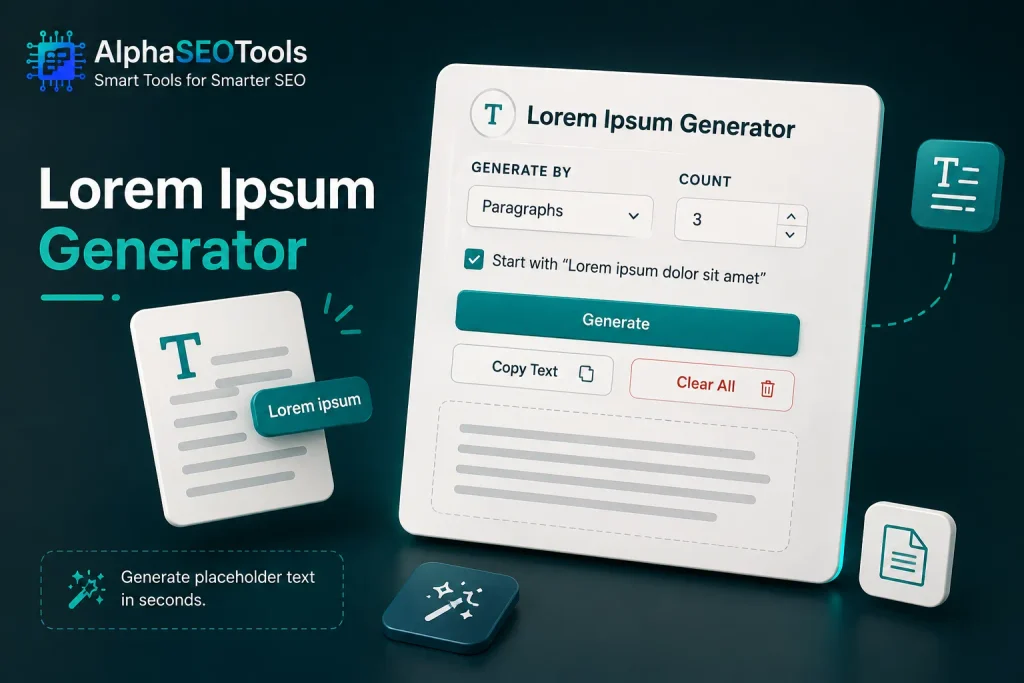
- Generation type: Choose between paragraphs, sentences, or individual words
- Count: Set an exact number, from 1 all the way up to 99,999
- Starting style: Decide whether to open with the classic “Lorem ipsum dolor sit amet” phrase or start with completely random text
- Output format: Clean, properly formatted text that pastes perfectly into any design or development environment
The tool also displays word count and character count after every generation. This matters more than you’d think. If you’re testing how a layout handles a 500-word article versus a 1,500-word article, you need to know exactly what you’re working with.
How to Use It: A Step-by-Step Walkthrough
Using this lorem ipsum generator takes less than thirty seconds. Here’s the process.
- Select your generation type. The dropdown menu offers three options: Paragraphs, Sentences, or Words. Paragraphs work best for article bodies and content-heavy sections. Sentences are ideal for testimonials, card descriptions, or feature lists. Words are useful for button labels, navigation items, or any element with strict character limits.
- Set your count. Use the stepper to choose a number. You can type directly or click the arrows. When you switch between modes, the count automatically adjusts to a sensible default—3 for paragraphs, 5 for sentences, 50 for words. You’re free to change it to anything you want.
- Choose your starting style. A checkbox controls whether the output begins with “Lorem ipsum dolor sit amet, consectetur adipiscing elit.” If you check it, the first paragraph or sentence opens with this familiar phrase. If you uncheck it, the generator produces entirely random text with no recognizable pattern.
- Click Generate. The text appears instantly in the output panel below. No loading screen, no server delay, no waiting.
- Copy or Clear. The Copy button grabs everything and places it on your clipboard. The Clear button wipes the output and resets the tool. Both buttons provide visual feedback—Copy changes to “Copied,” and Clear changes to “Cleared”—so you know the action worked.
That’s it. No learning curve, no documentation needed. The tool is self-explanatory.
When to Use Paragraphs, Sentences, or Words
The three generation modes serve different purposes. Knowing which one to use saves time and produces better mockups. Research from Adobe found that 73% of designers report spending more time on repetitive tasks than on actual creative work, and having the right text format for the job reduces that friction.
Paragraphs
Use paragraphs when you’re designing full-page layouts—blog templates, article pages, about sections, or anything with substantial body content. A typical blog post might have 5 to 10 paragraphs. Generate that many, paste them in, and you’ll see how the page handles real text flow.
Paragraphs are also useful for testing pagination. If you’re building a blog index that displays 3 posts per page, generate 3 paragraphs to represent each post excerpt. It gives you an accurate preview without writing actual content. For guidance on structuring comprehensive content, the Pillar Page Overview explains how authoritative pages should be organized.
Sentences
Sentences work well for shorter content blocks. Think testimonial cards, feature descriptions, product highlights, or team member bios. Each of these elements might only have 2-4 sentences. Generating full paragraphs would be overkill.
The sentence mode also helps with typography testing. Individual sentences let you evaluate line length, readability, and how text wraps at different screen sizes. You can generate 20 sentences and quickly scan for awkward breaks or overly long lines.
Words
Word mode is for precise control. When you need exactly 10 words for a button label or 25 words for a meta description preview, this is the mode to use. The character count feature is especially valuable here—you can check exactly how many characters your text occupies.
SEO professionals often use word mode to test content length requirements. If you need to check how a title tag truncates at 60 characters, generate text and check the count. Adjust from there. This connects directly to broader content strategy work—the kind covered in the Search Intent Types Explained guide on the blog.
Classic Lorem Ipsum vs. Random Text: Which Should You Choose?
The checkbox for “Start with ‘Lorem ipsum dolor sit amet'” gives you a meaningful choice. Here’s what each option means.
Classic Lorem Ipsum
The classic opener is the traditional choice. It’s recognizable. Most clients and colleagues understand that it’s placeholder text, not final copy. Using classic Lorem Ipsum signals professionalism—it shows you’re following an established design convention.
This option is best for client presentations and formal design reviews. When a client sees “Lorem ipsum dolor sit amet,” they immediately understand the text is temporary. They won’t waste time reading it or asking questions about it. They’ll focus on the layout instead.
Random Text
Random text looks more like actual English content at a glance. The words are still Latin-derived and meaningless, but without the familiar opener, the text doesn’t immediately scream “placeholder.”
This option works well for internal testing when you don’t need the Lorem Ipsum convention. It’s also useful when you’re presenting to stakeholders who might be confused by Latin. Some product managers prefer random text because it looks closer to final copy.
There’s no right or wrong choice. It depends on your audience and your workflow.
Why a Dedicated Generator Beats Copying from Random Websites
You might be thinking: “I can just Google ‘Lorem Ipsum’ and copy text from any website. Why do I need a dedicated lorem ipsum generator?”
Fair question. Here’s the honest answer.
- Control over length. When you copy from a random website, you get whatever that site offers. Usually it’s a fixed block of text—maybe 500 words, maybe 1,000. If you need 150 words, you’re manually trimming. If you need 2,000 words, you’re copying the same block multiple times. A generator gives you the exact length you need, every time.
- Clean formatting. Text copied from websites often carries hidden formatting—extra spaces, weird line breaks, invisible characters. This can mess up your design when you paste it into a design tool or code editor. A dedicated generator produces clean, properly formatted text with no hidden surprises.
- Fresh variations. Most static Lorem Ipsum blocks are identical across websites. If you copy text from the same source twice, you get the exact same output. A generator with randomization creates unique text every time, which is useful when you’re filling multiple sections that shouldn’t look identical.
- Speed. The whole point of placeholder text is to save time. A generator that works in two clicks saves you minutes compared to searching, copying, pasting, and trimming.
Now, about the Alpha SEO Tools version specifically. This isn’t just another random generator. It’s built by people who understand what designers and developers actually need. The word count and character count features? Those exist because real users asked for them. The clean, ad-free interface? That’s a deliberate choice to respect your time and attention.
If you’re already using tools like the Data Storage Converter Tool or the XML Sitemap Generator on alphaseotools.com, the lorem ipsum generator fits naturally into your workflow. It’s not a separate service you need to bookmark and remember. It’s part of the same toolkit.
How This Tool Fits Into a Broader SEO and Content Workflow
Placeholder text is more than just a design convenience. It plays a real role in content strategy and SEO planning. Here’s how.
When content strategists plan page structures, they often need to visualize how different content lengths will look before the actual copy is written. The lorem ipsum generator helps them test those layouts. This connects to the broader concept of Content Pillar strategy, where comprehensive pages serve as the foundation for topical authority.
Technical SEO professionals use placeholder text when testing how search engines will crawl and index pages. The character count feature helps them verify meta descriptions and title tags meet length requirements. For a deeper understanding of how Googlebot interacts with your site, the Crawl Budget Secrets guide covers crawl efficiency in detail.
Content that’s too short or lacks substance can hurt rankings. The Thin Content SEO Problem guide explains why content depth matters and how to avoid pages that provide little value. When you’re mocking up a page with Lorem Ipsum, you’re not just testing design—you’re also planning where substantive content will eventually live.
For teams concerned about content freshness and long-term performance, the Content Decay Overview guide covers how pages lose relevance over time and how to keep content performing well. Placeholder text is temporary; the real content that replaces it needs to be built to last.
Stats That Matter
Here are some authoritative statistics that highlight why proper placeholder text matters in the design and content workflow.
- Nielsen Norman Group found that users form an opinion about a website’s visual design within 50 milliseconds. This means the layout you’re testing with Lorem Ipsum needs to be right before real content ever arrives.
- Adobe’s research shows that 73% of designers report spending more time on repetitive tasks than on actual creative work. A fast, reliable lorem ipsum generator reduces that repetitive burden, freeing designers to focus on what they do best.
- HubSpot’s content research indicates that the average blog post length for SEO performance is between 1,500 and 2,000 words. When testing how a layout handles that much content, you need placeholder text that accurately represents the final length—not just a 200-word block from a random website.
These numbers underscore a simple point: placeholder text is a tool for precision, not just a convenience. The right lorem ipsum generator gives you that precision.
Practical Tips for Using Placeholder Text Effectively
1. Match the approximate length of your final content
If your final blog post will be 1,200 words, generate 1,200 words of Lorem Ipsum. Using text that’s significantly longer or shorter gives you an inaccurate preview of how the layout will handle real content.
2. Test multiple lengths
Don’t just generate one version. Create short, medium, and long variations to see how your design adapts. A section that looks perfect with 50 words might collapse with 150. Testing different lengths catches these issues early.
3. Pay attention to line breaks and spacing
Lorem Ipsum reveals how your design handles paragraph breaks, line heights, and letter spacing. Notice if text feels cramped or stretched. These details matter for readability.
4. Replace placeholder text before launch
This should go without saying, but it’s worth repeating. Lorem Ipsum is temporary. Never ship a final product with dummy text still in place.
5. Use the character count for SEO work
If you’re testing title tags or meta descriptions, the character count feature is invaluable. Generate text, check the count, and adjust until you hit the right range. For more on how SERPs display content, the Zero Click Search Strategy guide covers featured snippets and direct answers.
6. Track your time investment
Design work involves multiple iterations. Using a Time Date Duration Calculator can help you understand how long each phase takes, from initial mockup to final approval. This data helps with project planning and client billing.
Frequently Asked Questions
What is the full text of Lorem Ipsum?
The traditional Lorem Ipsum passage reads: “Lorem ipsum dolor sit amet, consectetur adipiscing elit, sed do eiusmod tempor incididunt ut labore et dolore magna aliqua. Ut enim ad minim veniam, quis nostrud exercitation ullamco laboris nisi ut aliquip ex ea commodo consequat. Duis aute irure dolor in reprehenderit in voluptate velit esse cillum dolore eu fugiat nulla pariatur. Excepteur sint occaecat cupidatat non proident, sunt in culpa qui officia deserunt mollit anim id est laborum.” It’s derived from a work by the Roman philosopher Cicero, though centuries of use have scrambled the original Latin beyond meaningful translation.
Is Lorem Ipsum just dummy text?
Yes. Lorem Ipsum is purely placeholder text with no real meaning. Designers use it to fill space and evaluate visual layouts without being distracted by actual content. When clients see Lorem Ipsum, they understand the text is temporary and focus on design elements instead.
Is Lorem Ipsum real Latin?
Lorem Ipsum is based on real Latin but isn’t proper Latin itself. It comes from a treatise by Cicero, written around 45 BC. Over the centuries, the text has been scrambled, altered, and rearranged so extensively that it no longer forms coherent sentences. It sounds like Latin, which gives it the appearance of real language, but it doesn’t translate into meaningful prose.
What Are Some 100 words of Lorem Ipsum?
Here is a sample: “Lorem ipsum dolor sit amet, consectetur adipiscing elit. Sed do eiusmod tempor incididunt ut labore et dolore magna aliqua. Ut enim ad minim veniam, quis nostrud exercitation ullamco laboris nisi ut aliquip ex ea commodo consequat. Duis aute irure dolor in reprehenderit in voluptate velit esse cillum dolore eu fugiat nulla pariatur. Excepteur sint occaecat cupidatat non proident, sunt in culpa qui officia deserunt mollit anim id est laborum.” Using the generator’s word mode set to 100 will produce precisely this amount.
Final Thoughts
Placeholder text is a small thing. It’s not glamorous. No one brags about their lorem ipsum generator. But it’s the kind of small tool that makes a real difference in daily work. The minutes saved not hunting for dummy text add up. The clean formatting eliminates frustrating layout bugs. The word count feature answers questions before you have to ask them.
For anyone building designs, developing websites, or creating content, a reliable lorem ipsum generator is worth keeping close. Not because it’s exciting, but because it works. It removes friction from the creative process and lets you focus on what actually matters: making things look good and work well.
The Alpha SEO Tools version does its job without fanfare. It’s fast. It’s free. It doesn’t get in your way. Whether you’re a designer mocking up a client presentation, a developer testing a new theme, or a content strategist planning page structures, this tool gives you exactly what you need—clean, precise placeholder text in seconds.


