Free JPG to WebP Converter: Smaller Files, Faster Pages, Better Rankings
By Alpha SEO Tools | May 2025
Page speed is a Google ranking factor. And the biggest reason most websites load slower than they should is unoptimised images. Converting JPGs to WebP is one of the fastest performance wins available to any site, and a good JPG to WebP converter makes it a process that takes under a minute.
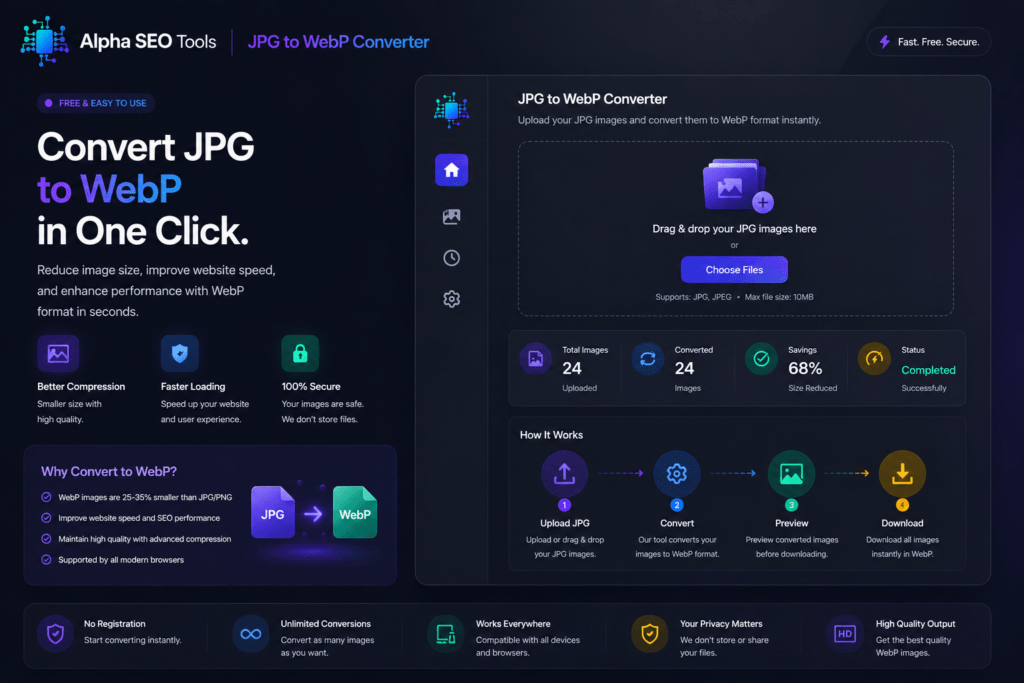
The free JPG to WebP converter at Alpha SEO Tools does the conversion directly in your browser. No software, no account, no file size cap. You get a compressed, high quality WebP file ready to drop straight into your site.
| 30%average file size reduction: JPG to WebP | 0.1sload time improvement per converted image | 94%+of modern browsers fully support WebP |
Why WebP Is the Format Your Website Should Be Using
WebP was created by Google for the web. It produces images visually identical to JPG or PNG but at a significantly smaller file size. That smaller file loads faster, uses less bandwidth, and improves Core Web Vitals scores, all of which Google’s algorithm rewards directly.
According to Google’s web.dev, WebP images are typically 25 to 35 percent smaller than equivalent JPEGs at the same quality. Across a site with dozens of images, that difference is meaningful. A JPG to WebP converter is the most direct way to start capturing those gains.
Looking For Aesthetic Captions For Instagram; We Got You… See Caption Haze
Who Actually Needs This
A JPG to WebP converter is useful for far more people than just developers:
Bloggers and Content Publishers
Every JPG you upload adds to your page weight. Converting before uploading means your posts load faster from day one, no plugin or server configuration required.
E-commerce Store Owners
Product images are the heaviest assets on most stores. Slow product pages push bounce rates up and conversion rates down. Running images through a converter before upload is one of the most direct performance improvements an e-commerce operator can make.
Web Developers and Designers
A browser-based JPG to WebP converter is the fastest option for one-off conversions during development without running a local script or installing image processing software on every machine in the project.
SEO Professionals
LCP, the time it takes for the main content to load, is directly affected by image weight. Running a client’s image library through a JPG to WebP converter produces measurable Lighthouse score improvements and real ranking gains.
Image Format Comparison: Where WebP Wins
Here is an honest comparison of the formats you are most likely working with, showing where each one excels and where it falls short:
| Format | Avg File Size | Quality Loss | Browser Support | Best Use | SEO Friendly |
| WebP | Smallest | None (lossless opt) | 94% browsers | Web, mobile, all | Yes |
| JPG | Medium | Some compression | All browsers | Photos, previews | Partial |
| PNG | Large | None (lossless) | All browsers | Logos, icons | Partial |
| AVIF | Smallest | None (lossless opt) | 80% browsers | Web images | Yes |
| GIF | Very Large | High for photos | All browsers | Simple animations | No |
| SVG | Tiny | None (vector) | All browsers | Icons, illustrations | Yes |
WebP is not the right choice in every single situation. SVG is still best for icons and illustrations. But for photographs, hero images, product shots, and blog imagery, WebP consistently beats JPG on file size with no visible quality difference at standard display sizes.
See The JPG To WebP Converter Tool By Alpha SEO Tools: JPG To WebP Converter
What the Alpha SEO Tools Version Delivers
The JPG to WebP converter at Alpha SEO Tools is built for speed and simplicity:
- Upload one or multiple JPG files with no per-session file limit
- Conversion happens entirely in your browser, images never reach an external server
- Output quality is preserved at the highest available WebP compression level
- Download files individually or all at once
- Works on any modern browser including mobile, no extension needed
- Free, no account, no watermark, no usage cap
The in-browser processing is the standout feature. With most online converters, your images pass through a third-party server. With this JPG to WebP converter, conversion is local. Your files never leave your device, which matters for product images, client assets, or anything proprietary.
The tool also handles PNG to WebP in the same interface, so one JPG to WebP converter session covers both formats without switching tools.
How to Convert in 3 Steps
The JPG to WebP converter needs no setup and no learning curve:
- Open the tool at alphaseotools.com. No login screen.
- Upload your JPG file by clicking or dragging and dropping.
- Download the converted WebP file. Output is ready immediately.
The whole process takes under thirty seconds for most images. No artificial queue or processing delay.
Complete Your Workflow on Alpha SEO Tools
Once images are converted with the JPG to WebP converter, these tools handle the rest of the performance and SEO workflow:
- Website Screenshot Generator to capture your site after optimised images are live
- Free Google SERP Preview Tool to check titles and descriptions after performance improvements go live
- SEO Metadata Tracker to audit how pages appear when shared on social including image previews
- Keyword Density Analyzer to verify content optimisation is solid alongside your technical improvements
- Pixels to REM Converter for responsive image sizing calculations during development
Useful External Reading
- Google web.dev: Use WebP Images for Google’s own case for WebP and the performance data behind it
- MDN Web Docs: WebP Format for a full technical breakdown of WebP and its browser support
- Google: Core Web Vitals for the official documentation connecting image performance to search ranking
Quick Answers (FAQ’s)
Will conversion reduce image quality?
WebP supports lossless compression. The JPG to WebP converter at Alpha SEO Tools uses high quality settings so the output looks identical to your original JPG at any standard display size. Smaller file, same appearance.
Does every browser support WebP?
Over 94 percent of browsers in global use support WebP as of 2025, including all modern versions of Chrome, Firefox, Safari, Edge, and Opera. For the vast majority of real-world traffic it works without any fallback.
Can I convert multiple files at once?
Yes. The JPG to WebP converter supports batch uploads so you can process an entire folder in one session rather than one file at a time.
Are my images private?
Yes. The JPG to WebP converter processes everything locally in your browser. Your files are never sent to any external server.
One Conversion. Real Impact.
Image optimisation is one of the most reliable technical SEO improvements you can make. Smaller files mean faster pages, better Core Web Vitals, and a better experience for every visitor. A good JPG to WebP converter makes implementing it free, fast, and permanent.
The free JPG to WebP converter at Alpha SEO Tools is live at alphaseotools.com right now. Upload your first image and see the file size difference for yourself. Under a minute. Permanent improvement.
Published by Alpha SEO Tools | alphaseotools.com | Free tools, zero sign up, always.