Free Disavow File Generator: Stop Bad Backlinks From Wrecking Your Rankings
By Alpha SEO Tools Team | Updated May 2025
Your backlink profile is supposed to be an asset. But here is the thing nobody tells you when you first get into SEO: some of those links are working against you. Toxic backlinks from link farms, irrelevant foreign websites, and spammy comment sections can quietly drag your Google rankings into the ground. And if you have ever received a manual penalty notice inside Google Search Console, you already know the sinking feeling that comes with it. This is exactly why every serious SEO professional keeps a reliable disavow file generator in their toolkit.
Not just any tool either. You need a disavow file generator that actually formats the output correctly, handles bulk domain input without breaking a sweat, and gets you a ready to upload .txt file in under two minutes. Alpha SEO Tools delivers exactly that, completely free, with zero sign up required. No cap on entries, no paywall hiding the download button, no nonsense.
Table of Contents
Are you Looking Instagram Captions For Your Posts; Well, Look No Further… Check our Site Caption Eren For The Best Captions To Suit Your Insta Aestheticity
What Is a Disavow File Generator and Why Does It Matter?
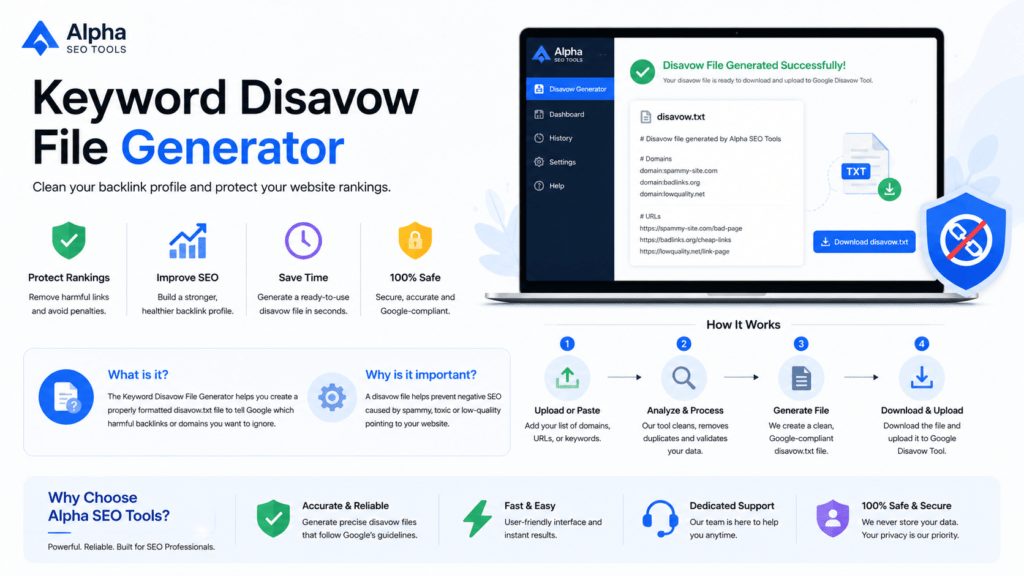
A disavow file generator is a tool that takes your list of bad or toxic domains and URLs and formats them into a plain text file that Google Search Console can read and process. Google introduced the Disavow Tool back in October 2012 specifically to give webmasters a way to say, these links are not mine to vouch for, please ignore them. The file itself follows a strict format: one domain or URL per line, with domains prefixed by domain: and comments starting with a # symbol. Get the formatting wrong and Google simply rejects the file.
This is where a proper disavow file generator saves you from yourself. It handles all that formatting automatically. You paste in your list of bad domains, it outputs a perfectly structured file ready to upload. According to Google’s official Search Console documentation, the file must be in UTF-8 or 7-bit ASCII format, must not exceed 2MB in size, and cannot contain more than 100,000 lines. A good generator handles all of these constraints without you needing to think about them.
When Do You Actually Need a Disavow File Generator?
Not every SEO situation calls for a disavow file generator. Google’s algorithm has gotten significantly better at ignoring low quality links on its own. But there are specific scenarios where pulling one out is the right call:
- You have received a manual action from Google for unnatural or spammy inbound links
- A competitor is running a negative SEO attack, pointing thousands of garbage links at your domain
- Your previous SEO agency bought links that now violate Google Penguin quality guidelines
- You acquired a domain or completed a site migration and inherited a toxic link profile
- Your backlink audit through tools like Ahrefs or Semrush surfaces a large number of suspicious referring domains
According to Ahrefs’ backlink audit guide, one of the first things you should try before disavowing anything is reaching out to webmasters directly to request link removal. If that does not work or is not practical at scale, that is when your disavow file generator becomes the most important tool in the room.
At a Glance: How Alpha SEO Tools Compares
Before you waste time with alternatives that hit you with row limits or hidden upgrades, here is an honest side by side breakdown:
| What You Need | Alpha SEO Tools | Manual Text File | Other Free Tools | Paid Platforms |
| Completely Free | Yes | Yes | Sometimes | No |
| No Account Required | Yes | Yes | Sometimes | No |
| Bulk Domain Input | Unlimited | Manual | Limited | Yes |
| Google Format Output | Auto | Manual | Partial | Yes |
| Duplicate Removal | Built In | No | Rare | Yes |
| Domain and URL Support | Both | Manual | Domain Only | Both |
| Download as .txt | One Click | Manual | Yes | Yes |
| Processing Speed | Under 2 Sec | Slow | Medium | Fast |
| Mobile Friendly | Yes | No | Partial | Yes |
| No Hidden Upsells | Yes | Yes | Sometimes | No |
How Alpha SEO Tools Makes This Genuinely Easy
The disavow file generator on Alpha SEO Tools was not thrown together as a sidebar feature. It was built for people who deal with real, large scale backlink audits on a regular basis. The team understands that when you are staring at 3,000 toxic domains exported from Ahrefs, the last thing you need is a tool that caps you at 100 entries.
Here is what you get out of the box:
- Unlimited bulk domain and URL input with no row restrictions whatsoever
- Automatic duplicate removal so your final file stays clean and concise
- Correct domain: prefix formatting applied automatically to every domain entry
- Comment line support so you can annotate your file for future reference
- One click download of your finished .txt file ready for Google Search Console upload
- Full mobile responsiveness because sometimes you are doing this from your phone between meetings
The thing that genuinely sets this disavow file generator apart is the zero friction experience. You land on the page, paste your list, click generate, download. That is genuinely it. No account creation popup, no email capture, no upgrade prompt blocking your download. Other tools in this space love to pull that move. Alpha SEO Tools does not.
And because this disavow file generator is part of a full SEO platform, you can immediately jump into related tools once your disavow file is done. Check your keyword density, preview your SERP snippet, analyse page metadata. Everything is right there, free, and genuinely useful.
How to Use the Disavow File Generator Step by Step
Using the disavow file generator at Alpha SEO Tools takes about two minutes from start to finish. Here is the exact process:
- Open the tool at Alpha SEO Tools. No login page will appear. You land directly on the tool.
- Export your bad backlink list from Google Search Console, Ahrefs, Semrush, or Moz. Copy the domain or URL column.
- Paste your list into the input field, one domain or URL per line. Mix of both is fine.
- Select whether you want to disavow at the domain level or URL level. When in doubt, go domain level. It is more thorough and covers all pages on that site.
- Click Generate. Your properly formatted .txt disavow file appears instantly in the output panel.
- Download the file and head over to Google Search Console Disavow Tool to upload it.
One thing worth knowing: when you upload a new file to Google Search Console, it completely replaces your previous one. So always keep a saved copy of your existing disavow file generator output before uploading a fresh version. Google takes roughly 48 hours to notice the new file and then several more weeks to recrawl affected links. Be patient with it.
Mistakes People Make That Cost Them Rankings
Even with a solid disavow file generator in hand, there are a few ways people mess this up. Knowing these beforehand will save you a serious headache:
- Disavowing good links by accident. A link from a legitimate site that just happens to look weird can tank your rankings if you pull it. Always audit before you disavow.
- Using URL level disavow when you should be using domain level. If a spammy site has 200 pages linking to you, disavowing each URL individually is a waste of time. Nuke the whole domain.
- Formatting errors in the file. Google is strict. If your file is not UTF-8 encoded or a line is formatted incorrectly, the whole upload may be rejected silently.
- Uploading and then never checking back. A disavow file is not a set and forget move. Revisit your link profile every few months as new toxic links can appear at any time.
- Not keeping a backup. Remember, every upload replaces the previous file entirely. Lose your old list and you lose visibility into what you already disavowed.
This is also why using a reliable disavow file generator that produces clean, correctly formatted output matters so much. A formatting mistake in a manually built file can fly under the radar for months while your rankings quietly suffer.
Why Alpha SEO Tools Is the Right Choice for This
There are honestly quite a few free tools online that claim to do what this disavow file generator does. Most of them have a catch. They cap you at 50 or 100 domains on the free tier. They make you sign up before you can download the file. They paste ads all over the page that make it hard to actually use the thing. Or they simply have not been updated in years and produce files that throw errors in Google Search Console.
Alpha SEO Tools is built differently. The disavow file generator on the platform is maintained, tested against current Google Search Console requirements, and genuinely unlimited for free users. The team behind it are active SEO practitioners, not developers who built a basic utility and walked away from it.
Beyond the disavow file generator, Alpha SEO Tools gives you access to a full suite of complementary tools. Use the Keyword Density Analyzer to check your content is optimised correctly. Run your metadata through the SEO Metadata Tracker. Check referring domain health with the Domain WHOIS Expiry Tracker. Preview your Google listing with the Free SERP Preview Tool. Every tool is free. Every tool is actually good.
Is this disavow file generator genuinely free with no limits?
Yes. The disavow file generator at Alpha SEO Tools is 100% free with no domain cap and no sign up requirement. There is no hidden paid tier and no upgrade prompt blocking your file download. It has always been this way on the platform.
What format does the output file follow?
The output is a plain .txt file formatted exactly to Google’s requirements. Domains are prefixed with domain: and comment lines begin with # so Google processes them correctly. The file is UTF-8 encoded and ready to upload directly to Google Search Console without any additional editing.
Can I disavow specific URLs rather than whole domains?
Yes. The disavow file generator supports both domain level and URL level entries. Use domain level when an entire site is spammy. Use URL level when only a specific page on an otherwise legitimate site is the problem. Most of the time domain level is the right call.
How long before I see results after uploading?
Google typically notices a newly uploaded file within around 48 hours. After that it takes several weeks or even months for Google to recrawl all the disavowed links and for the impact to show up in your rankings. Be patient. The results are real but they are not instant.
What if I accidentally disavow a good link?
You can undo it. Simply remove that domain or URL from your list in the disavow file generator, regenerate the file, and upload the updated version to Google Search Console. According to Google’s own guidance via Matt Cutts, it takes longer to undo a disavow than it does to apply one, so do your audit carefully before you hit upload.
More Tools Worth Bookmarking on Alpha SEO Tools
- Once your backlink cleanup is done, here is what to tackle next:
- SEO Keywords Finder Tool for discovering high intent keyword opportunities
- Free Google SERP Preview Tool to see exactly how your listing appears in search results
- Free Hyperlink Generator for Guest Posts for building clean, correctly formatted anchor links
- Website Screenshot Generator for capturing site screenshots for audits and reports
- Bulk URL Opener for opening large link lists quickly during research
- 8 Best Tips for On Page SEO on WordPress for a practical on page SEO refresher
Further Reading from Authoritative Sources
- Google Search Console: Disavow Links Official Guide for the exact format requirements and upload process from Google itself
- Ahrefs: How to Do a Full Backlink Audit for a step by step walkthrough of identifying toxic links before disavowing
- Moz: What Is Domain Authority for understanding how domain level metrics affect your overall link profile health
- Semrush: Backlink Audit Guide for a practical SEO agency perspective on cleaning up link profiles at scale
The Bottom Line
Toxic backlinks are one of those slow burn SEO problems that can quietly erode months of solid work. The fix is not complicated but it has to be done properly. That means a clean, correctly formatted file uploaded to Google Search Console, generated by a disavow file generator that actually knows what it is doing.
Alpha SEO Tools gives you exactly that at zero cost with zero friction. The disavow file generator handles your formatting, removes duplicates, supports both domains and URLs, and hands you a ready to upload file in seconds. Bookmark it, use it as part of your regular backlink audit routine, and use the rest of the platform to level up every other part of your SEO workflow while you are there.
Ready to clean up your link profile? Head to alphaseotools.com and get started right now.
Published by Alpha SEO Tools | alphaseotools.com | Free tools, no account needed, always.