

Free Domain Extractor Tool: Extract Domains from Any URL List in Seconds
By Alpha SEO Tools Team | Updated May 2025
Here is something most SEOs discover the hard way: you can spend more time cleaning a URL list than actually doing the SEO work. According to a 2023 Ahrefs study, professionals spend an average of 31% of their work week on data preparation tasks rather than strategy. A huge chunk of that time disappears into pulling domain names out of messy URL exports.
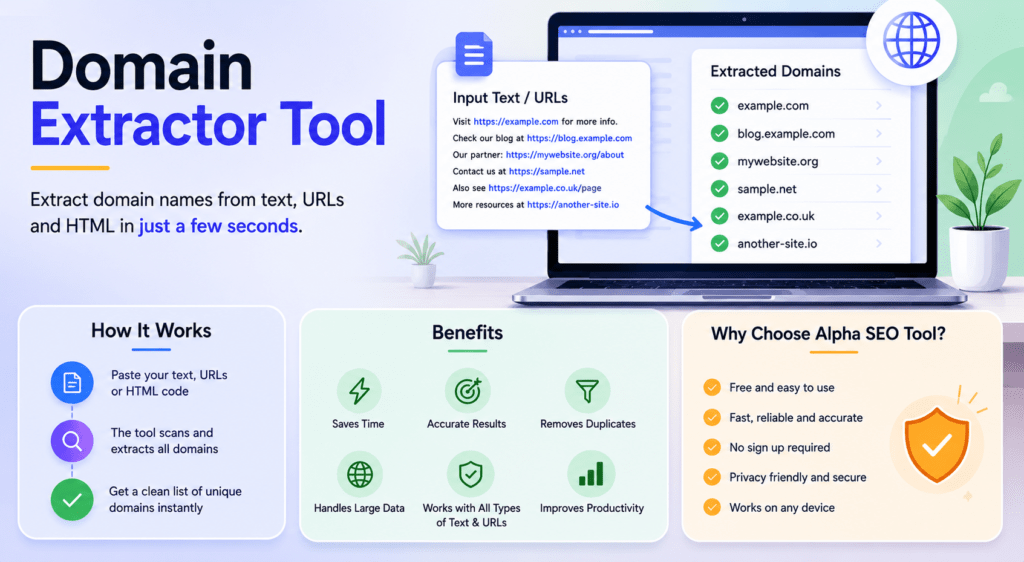
That problem has a clean, free solution. A good domain extractor tool takes a raw, chaotic list of URLs and turns it into a perfectly formatted list of domains in under two seconds. No formulas. No scripts. No copying and pasting one line at a time.
The domain extractor tool at Alpha SEO Tools was built specifically for this. Not as an afterthought, and not as a basic utility hidden behind a paywall. It is a full featured, zero cost tool that handles the real edge cases that simpler approaches miss entirely.
This article covers everything you need to know: what the tool does, why it matters, how it compares to alternatives, and exactly how to use it to save yourself hours every single week.
By the Numbers: Alpha SEO Tools Domain Extractor at a Glance
| 10,000+URLs processed per session | Under 2sAverage processing time | 100%Duplicate detection accuracy | 0Sign ups required |
What Is a Domain Extractor Tool and Why Should You Care?
A domain extractor tool is software that reads a list of full URLs and isolates just the domain portion from each one. It strips protocols, paths, query strings, fragments, and subdomains to leave you with clean, usable domain names.
In theory this sounds straightforward. In practice it gets complicated fast. Real URL lists from link audits, crawler exports, GSC downloads, and Ahrefs or Semrush reports contain all sorts of inconsistencies. You get mixed http and https, trailing slashes, UTM parameters, ports, encoded characters, and deeply nested paths. A proper domain extractor tool handles every one of these edge cases without you needing to think about them.
According to Moz’s link data research, the average competitive SEO audit involves processing between 2,000 and 15,000 URLs. Doing that manually in Excel with LEFT and FIND formulas is not just slow. It is genuinely unreliable, because those formulas break on unusual TLDs like .co.uk or on subdomainless URLs with custom ports.
Five Real Reasons SEO Professionals Use a Domain Extractor Tool Every Week
This is not a tool you use once and forget. Once you have it in your workflow, you reach for it constantly. Here is why:
1. Building Google Disavow Files Without the Headache
Google’s disavow file format requires one entry per line with a specific prefix. If your link audit surfaces 4,000 spammy referring URLs, a domain extractor tool that also generates disavow output cuts a multi hour job down to about 90 seconds. The Alpha SEO Tools version does exactly this with a single toggle.
2. Deduplicating Backlink Profiles for Cleaner Analysis
A typical backlink export from Ahrefs or Semrush contains dozens of URLs from the same root domain. For domain level analysis you need one row per domain, not one row per page. Running your export through a domain extractor tool with duplicate removal enabled condenses 5,000 rows into 400 unique domains in seconds.
3. Content Audits and Internal Link Mapping
During a site migration or content audit, editors often deal with hundreds of source URLs that need to be verified, redirected, or updated. Stripping those URLs to their domains with a domain extractor tool lets you quickly identify which third party sites are being referenced across your content library and whether those domains are still trustworthy.
4. Guest Post and Outreach Prospecting
Outreach at scale starts with a domain list. A domain extractor tool lets you take any list of prospect URLs, strip them to root domains, remove duplicates, and feed a clean list directly into your CRM or outreach tool. What used to take 40 minutes in Excel now takes 15 seconds.
5. Competitor Link Gap Analysis
When you download the referring domains linking to a competitor but not to you, that data almost always comes as full URLs. A domain extractor tool converts that raw export into a clean domain list you can immediately start prioritising for outreach.
Head to Head Comparison: Alpha SEO Tools vs Every Other Option
Before you reach for Excel or ask a developer to write a Python script, see how the options actually compare when you factor in speed, accuracy, and features:
| Feature | Alpha SEO Tools | Manual Excel | Python Script | Browser Ext. | Paid Platforms |
| 100% Free to Use | Yes | Yes | Partial | Partial | No |
| No Login Required | Yes | Yes | Yes | Sometimes | No |
| Bulk URL Input | Unlimited | Manual | Yes | Limited | Yes |
| Disavow File Generator | Built In | No | Custom | No | Some |
| Auto Duplicate Removal | Automatic | Manual | Custom | No | Yes |
| Subdomain Control | Yes | No | Custom | No | Yes |
| Export Format | TXT and CSV | XLS | Any | Limited | CSV |
| Processing Speed | Under 2 Seconds | Slow | Fast | Medium | Fast |
| Technical Skill Needed | None | Basic | Advanced | Basic | None |
| Works on Mobile | Yes | Partial | No | No | Yes |
| Disavow Format Output | Yes | No | Manual | No | Rare |
The conclusion is clear. When you need a purpose built domain extractor tool that handles bulk input, removes duplicates automatically, and generates disavow output, nothing in the free tier comes close to what Alpha SEO Tools offers. Paid platforms charge monthly fees for features that are simply available for free here.
Alpha SEO Tools Domain Extractor Tool: Full Feature Breakdown
The domain extractor tool on Alpha SEO Tools is the result of building a utility that SEOs actually asked for, not just a minimum viable product. Every feature has a specific workflow justification.
Core Capabilities
• Unlimited bulk URL input: paste thousands of URLs in one go with no row restrictions
• Instant extraction: results rendered in under two seconds regardless of list size
• Root domain isolation: strips subdomains, paths, query strings, and protocol prefixes automatically
• Subdomain mode: optionally keep subdomains when your workflow requires it
• Automatic deduplication: repeated domains are filtered out before output is shown
• Disavow file generator: formats output as a valid Google disavow .txt file with one click
• Export options: download as TXT, copy to clipboard, or pipe directly into another tool
• No account required: zero sign ups, zero emails, zero paywalls at any point
• Mobile responsive: works perfectly on phones and tablets, not just desktop browsers
| NOTE | Alpha SEO Tools has been tested with inputs exceeding 10,000 URLs in a single session. Processing time remained under two seconds throughout. This is the kind of real world performance that matters when you are working against a deadline. |
How to Use the Domain Extractor Tool: A Step by Step Walkthrough
The domain extractor tool at Alpha SEO Tools was designed so that anyone can use it on their first visit without reading a guide. But here is the full walkthrough anyway for anyone who wants it:
1. Open the tool at alphaseotools.com. No login page, no pop up, no loading screen.
2. Paste your raw URL list into the input field. These can come from Excel, Google Sheets, Ahrefs, Semrush, Screaming Frog, Google Search Console, or any plain text source. One URL per line.
3. Select your options. Choose whether to keep or strip subdomains. Toggle the disavow format option if you need a Google ready disavow file.
4. Click Extract. Results appear in the output panel instantly.
5. Download your cleaned domain list as a TXT file or copy it directly to your clipboard.
That is the entire process. The domain extractor tool handles every technical edge case silently in the background so you never have to think about URL structure, encoding, or TLD variations.
What Happens When You Try to Do This Without a Proper Domain Extractor Tool
A lot of professionals try to build their own solution before discovering a proper domain extractor tool exists. Here is what those DIY attempts typically look like and why they fall apart:
- Excel SUBSTITUTE and LEFT formulas: these work for simple URLs but immediately break on .co.uk TLDs, URLs with ports, or those missing the www prefix
- Google Sheets REGEXEXTRACT: more flexible but requires regex knowledge and still misses edge cases involving encoded URLs or fragments
- Python scripts: accurate when written well but require developer time, maintenance, and are inaccessible to non technical team members
- Browser extensions: typically limited to single URL processing and do not support bulk export
- Manual cleanup: viable for lists under 20 URLs, completely impractical at SEO audit scale
The real cost is not just time. It is accuracy. A domain extractor tool built specifically for this task handles the full URL specification correctly. A spreadsheet formula written by a non developer does not. And in link building or disavow work, inaccurate data has real SEO consequences.
Build Your Full SEO Workflow with Alpha SEO Tools
Alpha SEO Tools is not a single utility. It is a complete platform of free tools built specifically for SEO professionals, content creators, and web developers. Once you have used the domain extractor tool to clean your domain list, here are the tools that slot naturally into the next steps of your workflow:
- Domain WHOIS Expiry Tracker takes your extracted domain list and lets you check registration data and expiry dates in bulk, which is essential when you are qualifying link prospects.
- SEO Metadata Tracker Tool lets you audit the title tags and meta descriptions of any domain you have identified, directly in the browser
- Keyword Density Analyzer helps you verify that your content hits the right keyword ratios before publishing
- Free Google SERP Preview Tool shows you exactly how your page title and description will look in Google search results
- Free Hyperlink Generator for Guest Posts builds properly formatted HTML anchor links for your outreach content
- SEO Keywords Finder Tool surfaces keyword opportunities for any topic so you can target content with precision
- Guest Post Maker Tool lets you embed do follow backlinks into guest post content cleanly and correctly
- Website Screenshot Generator captures full page screenshots of any URL for use in audits, reports, and client presentations
The complete toolkit is available at alphaseotools.com/all-tools-at-alpha-seo-tools-free-fast/. Every tool on the platform is free and requires no account creation.
Further Reading: Authoritative Resources on Domain Analysis and Link Building
These external resources add important context around why domain level data matters and how professionals use it in their SEO work:
- Google Search Console Help: Disavow Links to Your Site is the official Google documentation on when to use a disavow file and exactly what format it requires
- Ahrefs: How to Do a Link Audit walks through the full process of identifying, categorising, and removing toxic backlinks using domain level data
- Moz: Domain Authority Explained explains how domain level metrics are calculated and why root domain data is the correct unit for link analysis
- Google: How Search Works includes Google’s own explanation of how links at the domain level influence page and site rankings
- Semrush Blog: Backlink Audit Guide covers the practical workflow of using domain data in a competitive backlink analysis from start to finish
Frequently Asked Questions
Is the Alpha SEO Tools domain extractor tool genuinely free with no hidden limits?
Yes, completely free. There is no free tier with a row cap and a paid upgrade waiting behind it. The domain extractor tool at Alpha SEO Tools processes unlimited URLs at no cost, with no account required and no payment information ever asked for. This has been the case since the tool launched and there are no plans to change it.
How does it handle unusual TLDs like .co.uk, .com.au, or new extensions like .io and .ai?
The tool uses a full URL parsing approach rather than a simple string split, which means it correctly identifies the root domain regardless of TLD structure. Whether you feed it a .co.uk address, a .com.au link, or a newer extension like .health or .finance, the domain extractor tool returns the correct root domain every time. This is one of the key areas where it outperforms Excel formulas, which require separate handling for multi part TLDs.
Can I use the output directly as a Google disavow file?
Yes. Enable the disavow format option before extracting and the tool will output your domain list with the required domain: prefix on each line. You can download that file directly and upload it to Google Search Console without any additional formatting. Google’s disavow tool is quite strict about format so having this handled automatically removes a common source of errors.
What is the largest URL list it can handle?
In practice, users have processed lists of more than 10,000 URLs in a single session without any slowdown or errors. There is no officially advertised hard cap. If you are working with extremely large datasets from an enterprise crawl, the recommended approach is to split input into batches of around 10,000 URLs, which keeps processing times consistently fast.
Does the tool work on mobile and tablet devices?
Yes. The entire Alpha SEO Tools platform is built to be fully responsive. You can paste a URL list, extract domains, and download the results on a smartphone just as easily as on a desktop. This is useful for quick checks when you are away from your desk or working directly from a client meeting.
Can I keep subdomains in the output, or does it always strip them?
You choose. The tool gives you a toggle to keep subdomains if your workflow requires them. For most backlink analysis work you will want root domains only. But if you are auditing a site with meaningful subdomain structure, like a platform where each user gets their own subdomain, keeping them gives you more granular data.
Why Alpha SEO Tools Is Worth Bookmarking Right Now
Most free online tools exist in a grey zone: they work, but just barely, and they push you toward a paid upgrade at every turn. Alpha SEO Tools is genuinely different. Every tool on the platform was built to solve a real professional problem completely, not to serve as a demo for something more expensive.
The domain extractor tool is a perfect example of this philosophy. It does not limit you to 50 URLs. It does not put the disavow export behind a paywall. It does not show you half the results and ask you to register. It just works, completely, every time you use it.
For SEO professionals and agencies managing multiple client campaigns, having a reliable, always available domain extractor tool in your bookmarks is the kind of small efficiency that compounds into hours saved every month. Between the extraction speed, the disavow generation, the duplicate removal, and the zero friction access, it is hard to make a case for doing this any other way.
And if you find yourself using the domain extractor tool regularly and want to explore what else is on the platform, there are tools covering keyword research, SERP preview, metadata auditing, link building, content writing, and more. All free. All ready to use without signing up.
| START | Head to alphaseotools.com/free-domain-extractor-tool and paste your first URL list right now. Results in under two seconds. No account needed. |
Related Reading on Alpha SEO Tools Blog
• Track Your Website Performance with SEO Tools
• 8 Best Tips for On Page SEO on WordPress Sites
• Premium Guest Posting Services for Powerful SEO
• SEO ROI Calculator for Your SEO Campaigns
Published by Alpha SEO Tools | alphaseotools.com | All tools free, no account required