URL Slug Generator: The Small Detail That Makes a Big SEO Difference
Published on AlphaSEOTools.com | Keyword: url slug generator |
Most people don’t spend much time thinking about URL slugs. They publish a page, accept whatever their CMS auto-generates, and move on. But the slug sitting at the end of your URL is one of the few places where a small, one-time decision has a lasting effect on how your page ranks, how it reads in search results, and how confidently someone clicks on it. A url slug generator turns what is usually a guesswork task into a precise, consistent, and SEO-correct output every time.
This article explains what a URL slug actually is, why it matters more than most site owners realise, what the formatting rules are, and how Alpha SEO Tools’ free url slug generator handles the whole process for you in seconds.
What a URL Slug Is and Why It Carries SEO Weight
A URL slug is the part of a web address that comes after the domain and any subdirectory — the human-readable identifier for a specific page. In the URL alphaseotools.com/url-slug-generator, the slug is url-slug-generator. It’s short, it’s descriptive, and it tells both the visitor and the search engine exactly what the page is about before a single word of content loads.
Google confirms in its URL structure best practices documentation that words in URLs are used to better understand the content of a page. A slug that matches the page’s primary keyword reinforces topical relevance at the URL level — which is one of the signals that contributes to how a page is categorised and ranked. It’s not the heaviest ranking factor in isolation, but it’s one of the easiest to get right, and getting it wrong is surprisingly common.
Auto-generated slugs are the main culprit. WordPress and many other platforms default to turning your full page title into the slug, complete with stop words, special characters, and sometimes query strings. A title like “The 10 Best Free Tools for On-Page SEO (Updated 2025)” becomes the-10-best-free-tools-for-on-page-seo-updated-2025 — which is long, includes filler words, and competes poorly against a clean, direct slug. A url slug generator strips all of that and gives you the optimised version instantly.
The Six Rules of a Well-Formatted URL Slug
Getting a slug right isn’t complicated, but there are specific formatting standards that matter — both for how search engines read URLs and how servers handle them. A good url slug generator handles all of these automatically, but understanding the logic behind each rule helps you make better decisions about the pages you’re publishing.
| Slug Rule | Good Example | Why It Matters |
| Use hyphens, not underscores | ✔ url-slug-generator | Google treats hyphens as word separators; underscores merge words into one token per Google Search Central |
| All lowercase letters only | ✔ free-seo-tools | URLs are case-sensitive on most servers — mixed case creates duplicate content risk |
| Remove stop words where possible | ✔ seo-keyword-tool | Words like ‘a’, ‘the’, ‘and’, ‘for’ add length without adding ranking relevance |
| Keep it short and descriptive | ✔ keyword-density-checker | Shorter slugs are easier to share, read, and are generally preferred by search engines |
| Match the page’s primary keyword | ✔ css-gradient-generator | Slug should reflect what the page is actually about — keyword match reinforces topical relevance |
| Avoid dates unless necessary | ✔ random-password-guide | Date-based slugs date your content and make URL restructuring harder as the site grows |
These rules are not arbitrary style preferences. They reflect how Google Search Central’s URL guidelines recommend structuring URLs for both crawlability and user readability. A url slug generator applies all six automatically — you paste a title and get back a slug that already follows every one of them.
How Alpha SEO Tools’ URL Slug Generator Works
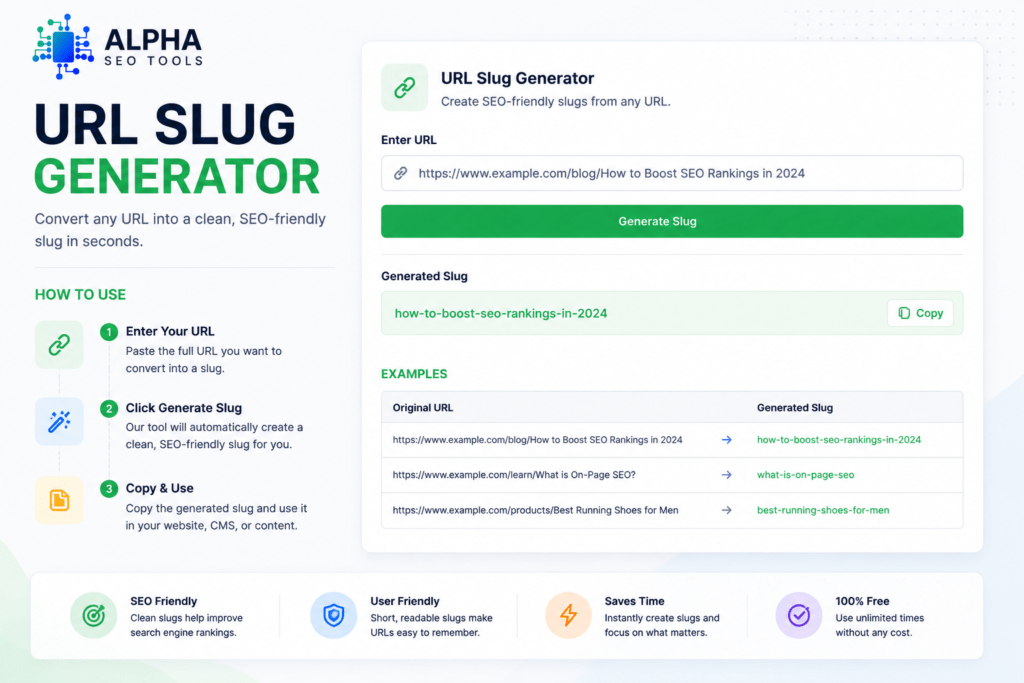
Alpha SEO Tools built their url slug generator around a single goal: take any page title or phrase and return a perfectly formatted URL slug with zero manual editing required. No settings to configure, no account to create, no output to fix afterward.
| WHAT THE TOOL DOES |
| Converts any text input — page titles, article headings, product names — into a clean slug |
| Lowercases all characters automatically, eliminating any case-sensitivity risk |
| Replaces spaces and special characters with hyphens, exactly as Google recommends |
| Strips stop words and unnecessary filler to keep the slug tight and keyword-focused |
| Outputs a copy-ready slug you can paste directly into your CMS or codebase |
Step 1 — Paste Your Title or Phrase
Open the url slug generator and enter your page title, article heading, or whatever phrase the page is built around. You don’t need to pre-format it — paste it exactly as you have it, including capitalisation and punctuation.
Step 2 — Get the Formatted Slug
The url slug generator processes the input and returns a properly formatted slug: lowercased, hyphen-separated, cleaned of special characters and stop words. The output is already in the exact format a CMS or web server expects.
Step 3 — Copy and Apply
Copy the result and paste it into your page’s slug field — whether that’s WordPress, Shopify, Webflow, or a custom CMS. One click. No second-guessing, no reformatting, no trailing slashes or encoding issues to debug.
Why Consistent Slug Hygiene Matters at Scale
For a single-page website, a slightly messy URL probably doesn’t move the needle much. But for a blog with 50 posts, an e-commerce store with hundreds of product pages, or any site that publishes content regularly, slug consistency becomes a real structural issue. Inconsistent slugs make internal linking harder, create unnecessary URL variation that dilutes crawl equity, and make site restructuring in the future significantly more painful.
Need Some Premium Captions For Your Instagram Posts?? We Have Just the Thing For You >> See Caption Eren
Making a url slug generator part of your content publishing workflow solves this before it becomes a problem. Every page that goes live with a clean, consistent slug is one less URL to fix during a future SEO audit. It’s the kind of small discipline that separates well-structured sites from ones that accumulate technical debt quietly over time.
The same logic applies to other parts of your on-page setup. If you’re also standardising how you handle images — converting them to WebP before upload, for instance — checking how pages appear in search results, and verifying your site looks exactly right before publishing, you’re building a workflow that produces technically solid output every time. Alpha’s bulk image to WebP converter, the website screenshot generator for visual QA checks, and the tools covered in articles like the live internet speed test guide fit directly into that same disciplined approach.
Common Slug Mistakes That Quietly Hurt Your Rankings
Even experienced site owners make slug mistakes — usually because the CMS auto-generates something that looks fine on the surface but isn’t optimised. Here are the most common issues a url slug generator prevents:
Getting the slug right at publish time is always cheaper than fixing it later. And just like generating a strong password with Alpha’s random password generator or building clean CSS with the CSS gradient generator — the right tool makes the right output the path of least resistance.
Frequently Asked Questions (FAQ’s)
Should a URL slug always match the page title exactly?
Not exactly — and that’s the point. Page titles are written for humans and often contain stop words, punctuation, and capitalisation that don’t belong in a URL. A url slug generator takes your title and strips it down to the essential, keyword-relevant words in the correct format. The slug should reflect the core topic of the page, not replicate the full title character for character.
How long should a URL slug be?
There’s no hard character limit enforced by Google, but shorter is consistently better. Most well-optimised slugs are between three and five words — long enough to be descriptive, short enough to be readable in a search result snippet and easy to share. A url slug generator removes stop words automatically, which typically brings a long title down to a concise, well-targeted slug without any extra effort.
Does changing an existing slug hurt SEO?
It can — if you don’t handle the redirect properly. When you change a slug on a page that’s already indexed, any existing backlinks and crawled references point to the old URL. Without a 301 redirect from the old slug to the new one, those links become dead ends. If you do set up the redirect correctly, the SEO equity transfers over time. The safest approach is to get the slug right before the page goes live, which is exactly what a url slug generator helps you do.
Can I use a URL slug generator for product pages, not just blog posts?
Absolutely. The slug formatting rules are the same regardless of page type — blog post, product page, category page, or landing page. If anything, e-commerce sites benefit more from consistent slug hygiene because they typically have far more pages and the slug is often the only real differentiation between similar product URLs. Running product titles through a url slug generator before publishing keeps the entire catalogue clean and consistently formatted.
More Free Tools From Alpha SEO Tools
If you’re building a clean, optimised publishing workflow, these tools from Alpha SEO Tools cover the other pieces of the same puzzle. The bulk image to WebP converter handles image optimisation before upload, the live internet speed test tells you where your connection stands, and the random password generator keeps your admin accounts properly secured. For design and front-end work, the CSS gradient generator builds production-ready gradient code visually, and the public IP checker is a fast diagnostic when you need to verify your connection details. Every tool on the platform is free, and none of them require an account.
The Bottom Line
A URL slug is one of the smallest decisions in publishing a web page — and one of the most permanent. Get it right once and it works quietly in your favour for the lifetime of the page. Get it wrong and you’re either living with a suboptimal URL forever or dealing with the redirect headache later. A url slug generator makes the right version the default, not the result of careful manual effort every time.
Alpha SEO Tools’ url slug generator is fast, free, and produces output that needs no editing. Paste your title, copy the slug, publish with confidence. It’s the kind of tool that earns a permanent spot in your content workflow not because it’s flashy, but because it’s consistently useful.
Every URL you publish is a small signal to Google. Make them all count.
alphaseotools.com | Article: URL Slug Generator | Sources: Google Search Central URL structure docs, Google Developers